VOOZH about

URL: https://www.geeksforgeeks.org/python/otsu-thresholding-using-opencv/

⇱ Otsu Thresholding using OpenCV - GeeksforGeeks


  • Courses
  • Tutorials
  • Interview Prep

Otsu Thresholding using OpenCV

Last Updated : 18 Aug, 2025

Otsu’s Thresholding is an advanced image segmentation technique used when an image contains two distinct pixel value groups (bimodal distribution). Unlike simple or adaptive thresholding, Otsu’s method automatically calculates the optimal threshold by analyzing the image histogram, making it especially useful when you don’t know in advance the best threshold value.

  • OpenCV performs Otsu’s thresholding with the regular cv2.threshold() function, adding the cv2.THRESH_OTSU flag.
  • No need to manually specify a threshold value! The function finds it for us.

Step-by-Step Implementation

Step 1: Import libraries and Image Preparation

Sample image can be downloaded from here.

Let's import the required libraries and load our image on which we will perform the operations,

  • cv2: Handles image reading, processing and applies thresholding techniques.
  • numpy: Supports efficient array operations, enabling fast image data handling.
  • matplotlib.pyplot: Displays images and results in Colab notebooks.

Step 2: Helper Function

Define the helper function which helps in displaying the images,

Step 3: Display Original Image

Output:

👁 original-greyscale
Original Grayscale Image

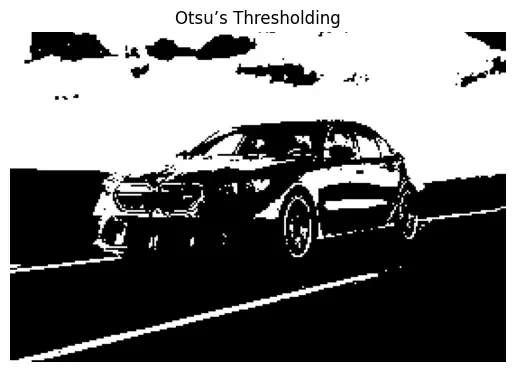
Step 4: Otsu’s Thresholding

The threshold value is not provided by us, instead, Otsu's method determines it automatically based on the image’s histogram. This makes separation of foreground and background particularly strong on bimodal images.

Output:

👁 otsu-thresholding
Otsu's Thresholding
Comment