VOOZH about

URL: https://www.geeksforgeeks.org/python/searching-hotel-room-project-in-django/

⇱ Searching Hotel Room Project in Django - GeeksforGeeks


  • Courses
  • Tutorials
  • Interview Prep

Searching Hotel Room Project in Django

Last Updated : 23 Jul, 2025

We will build a simple Django-based hotel search app that lets users dynamically sort and filter hotels by price. Using Django for the backend and Vue.js for the frontend, we’ll create an interactive interface where users can instantly view hotels sorted in ascending or descending order and filter by maximum price, all without page reloads.

Setup Django Project and App

Prerequisites:

Create a new Django project and navigate into it:

django-admin startproject hotel_search
cd hotel_search

Create a Django app called home:

python manage.py startapp home

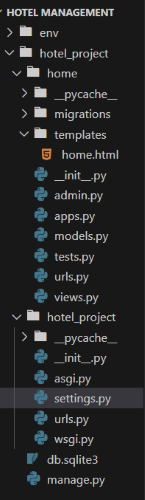
File Structure

👁 fiiiiiiiiiii
File Structure

Then we need to register app in settings.

INSTALLED_APPS = [
"django.contrib.admin",
"django.contrib.auth",
"django.contrib.contenttypes",
"django.contrib.sessions",
"django.contrib.messages",
"django.contrib.staticfiles",
"home",
]

Define the Hotel Model

home/models.py: This code defines a Django model named 'Hotel' with fields for the hotel's name, price, description, and timestamps for creation and updates. The __str__ method returns the hotel's name for a human-readable representation.

Create Views for Display and API

home/views.py: This code defines two view functions:

  • home(request): This function renders the 'home.html' template when the home page is accessed.
  • get_hotel(request): This function handles requests for hotel data. It retrieves hotel objects from the database, allows sorting by price (ascending or descending), and filters by price based on the 'amount' parameter in the GET request. It then converts the hotel information into JSON format and returns it as a JSON response.
  • Comments have been added to explain each part of the code and its functionality.

Admin Registration

home/admin.py: Then we register out app in admin.py file.

  • It imports the necessary modules.
  • It defines a custom admin class, HotelAdmin, to specify how the Hotel model is displayed in the admin interface. It chooses which fields to display in the list view.
  • It registers the Hotel model with the custom admin class, connecting it to the admin interface so that you can manage hotel records easily.

Configure URLs

Project/urls.py: Then we map the project url with app url by adding include method for map the urls.py file of our app

App/urls.py: Then we write a connect all files by creating the urls in app's urls.py file.

Templates Folder

In template folder we create the home.html file through which we create the representation of our project so let's start

  • This is an HTML page that uses Vue.js for interactivity and Bootstrap for styling.
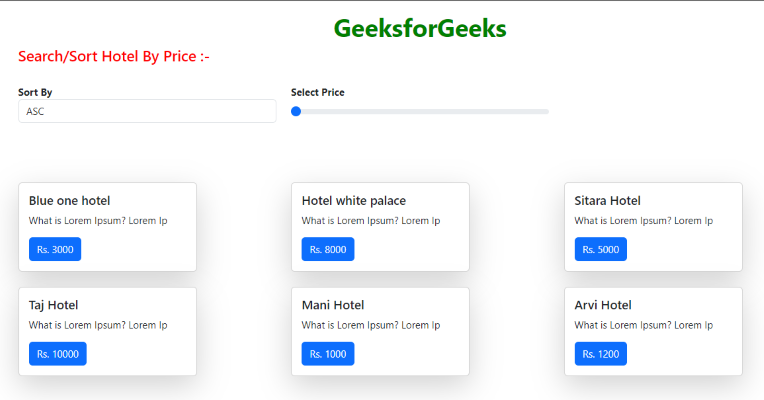
  • It displays a list of hotels and provides controls for sorting and filtering hotels by price.
  • The JavaScript code within the <script> tags initializes a Vue.js app (var app = new Vue) that fetches hotel data from an API based on sorting and price filtering.
  • The data-binding syntax [[hotel.hotel_name]] and event listeners like @change="sortBy" are used to connect Vue.js to the HTML elements.
  • The page loads Bootstrap CSS and JavaScript for styling and functionality.

Run Migrations and Create Superuser

Run the following commands to prepare your database:

python manage.py makemigrations
python manage.py migrate
python manage.py createsuperuser

Use the Django admin panel at http://127.0.0.1:8000/admin/ to add hotel records.

Run Your Server and Test

Start your development server:

python manage.py runserver

Output

👁 HotelRoomProjectUsingDjango
Home.html
Comment