Recurrent Neural Networks (RNNs) are widely used for sentiment analysis because they can capture contextual and sequential information from text data.
- Designed for sequence-based tasks
- Learns patterns from sequential text data
- Captures contextual information using hidden states
- Commonly used in NLP and sentiment analysis tasks
Implementation
1. Importing Libraries and Dataset
Here we will be importing numpy, pandas, Regular Expression (RegEx), scikit-learn and tensorflow.
2. Loading Dataset
We will be using swiggy dataset of customer reviews.
You can download dataset from here.
- pd.read_csv() : Reads the CSV file into a Pandas DataFrame
- data.columns : Accesses the column names of the DataFrame
- tolist() : Converts the column names from an Index object to a regular Python list
Output:
Columns in the dataset:
['ID', 'Area', 'City', 'Restaurant Price', 'Avg Rating', 'Total Rating', 'Food Item', 'Food Type', 'Delivery Time', 'Review']
3. Text Cleaning and Sentiment Labeling
The review text is cleaned and sentiment labels are generated from ratings before training the model.
- Converts review text to lowercase
- Removes special characters and punctuation
- Creates sentiment labels from ratings
- Removes rows with missing values
4. Tokenization and Padding
The text data is converted into numerical sequences and padded to ensure all inputs have the same length for model training.
- max_features = 5000 sets vocabulary size
- max_length = 200 defines sequence length
- Tokenizer() converts words into integer sequences
- fit_on_texts() creates the word index
- texts_to_sequences() converts reviews into sequences
- pad_sequences() pads or truncates sequences to equal length
- y = data['sentiment'].values extracts sentiment labels
5. Splitting the Data
The dataset is divided into training, validation and test sets while preserving the sentiment class distribution.
- train_test_split(..., test_size=0.2, stratify=y) splits data into 80% training and 20% testing
- train_test_split(..., test_size=0.1, stratify=y_train) creates a validation set from training data
- stratify maintains balanced class distribution across all sets
6. Building RNN Model
A simple RNN model is built and compiled for binary sentiment classification.
- Sequential([...]) creates the neural network model
- Embedding(...) converts words into dense vector representations
- SimpleRNN(64, activation='tanh') adds an RNN layer with 64 units
- Dense(1, activation='sigmoid') creates the binary output layer
- model.compile(...) configures the model with loss function, optimizer, and accuracy metric
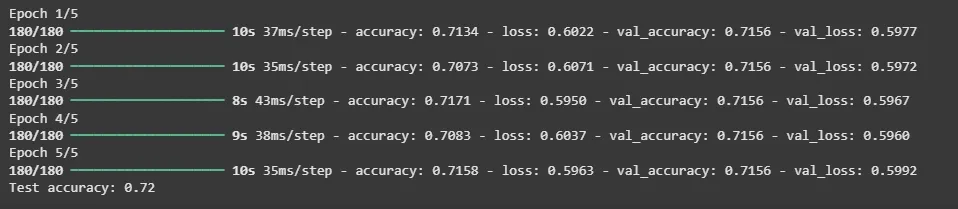
7. Training and Evaluating Model
The model is trained on the training data, validated during training and finally evaluated on the test dataset.
- model.fit(...) trains the model for 5 epochs with batch size 32
- Uses validation data to monitor performance during training
- model.evaluate(...) tests the model on unseen data
- print(...) displays the final test accuracy
Output:
👁 training
Training and Evaluating Model8. Predicting Sentiment
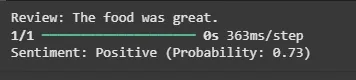
A function is created to preprocess a review, predict its sentiment, and display the prediction result.
- review_text.lower() converts text to lowercase
- re.sub(...) removes special characters and punctuation
- tokenizer.texts_to_sequences() converts text into word sequences
- pad_sequences() pads the sequence to fixed length
- model.predict() predicts sentiment probability
- Returns Positive if probability ≥ 0.5, otherwise Negative