VOOZH about

URL: https://www.geeksforgeeks.org/python/transactions-management-in-postgresql-python/

⇱ Transactions management in PostgreSQL Python - GeeksforGeeks


  • Courses
  • Tutorials
  • Interview Prep

Transactions management in PostgreSQL Python

Last Updated : 18 Jun, 2026

psycopg is a PostgreSQL adapter for Python that enables Python applications to communicate with PostgreSQL databases. It provides built-in transaction management features, allowing multiple SQL statements to be executed as a single unit of work while ensuring data integrity and consistency.

Prerequisites

  • PostgreSQL installed and running.
  • Knowledge of SQL statements and database transactions.
  • Psycopg (Psycopg 3) installed for connecting Python applications to PostgreSQL databases.

Install the required package using:

pip install --upgrade pip
pip install "psycopg[binary]"

Transactions Management

Transaction management allows multiple database operations to be executed as a single logical unit of work. Transactions follow the ACID properties, which help maintain data integrity, consistency, and reliability during database operations.

PropertyDescription
AtomicityEnsures all operations in a transaction succeed together. If any operation fails, the entire transaction is rolled back.
ConsistencyEnsures the database remains in a valid and consistent state before and after a transaction.
IsolationPrevents concurrent transactions from interfering with each other until changes are committed.
DurabilityEnsures committed changes are permanently saved, even if a system failure occurs.

Necessary Concepts:

  • Transactions: A sequence of SQL statements executed as a single unit of work. If any statement fails, the entire transaction is rolled back to maintain data consistency.
  • Commit: A SQL operation that permanently saves the changes made during a transaction to the database.
  • Rollback: A SQL operation that undoes all changes made during the current transaction and restores the database to its previous state.

PostgreSQL Database

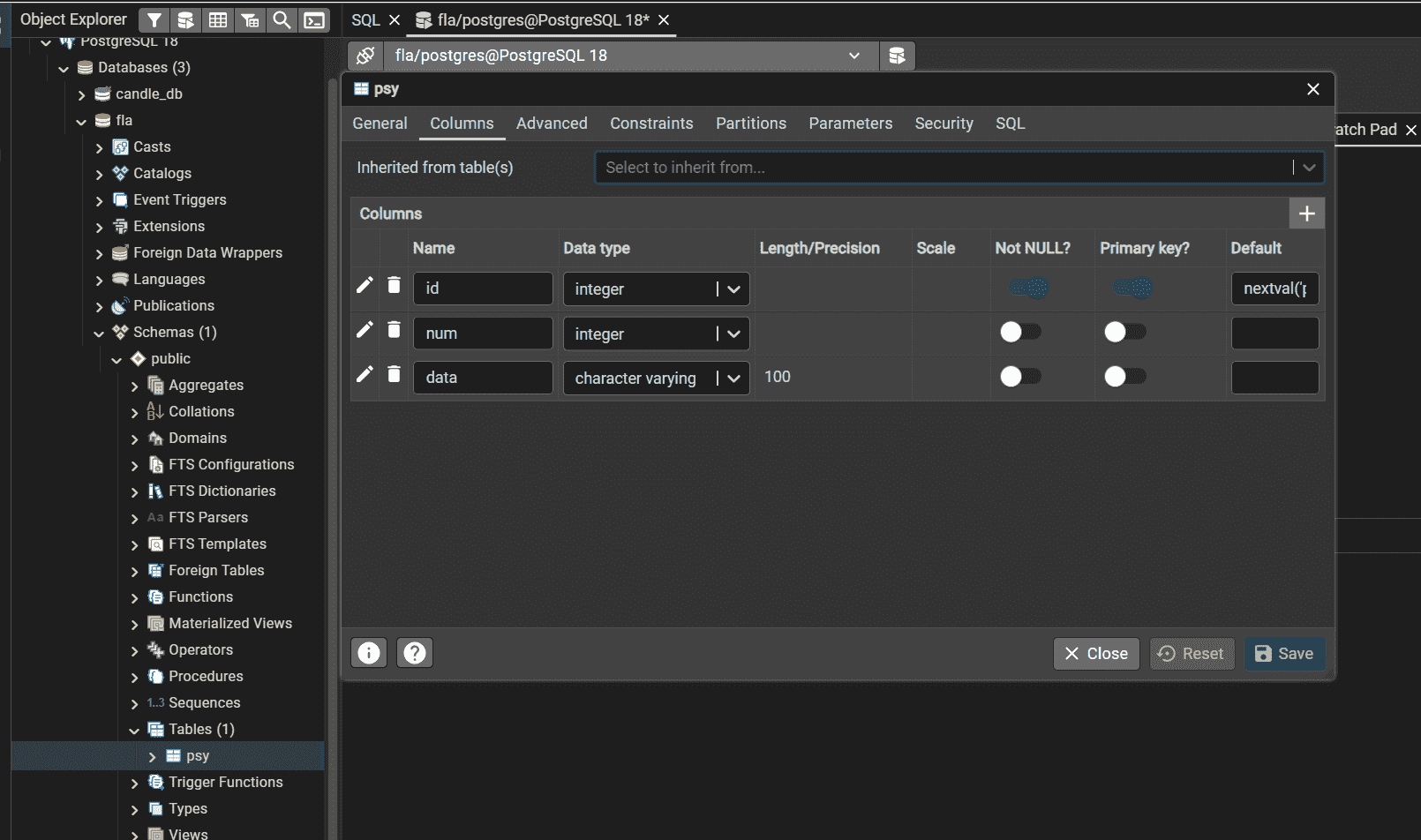
First, create a PostgreSQL database and a table named psy. The psy table contains three columns: id, num, and data, which will be used throughout the examples in this article.

👁 Screenshot-2026-06-18-095310

Autocommit Transactions

  • Autocommit is a mode in which every SQL statement is automatically committed immediately after execution.
  • Each query is treated as an independent transaction, eliminating the need to explicitly call commit().
  • Changes made using INSERT, UPDATE, or DELETE are permanently saved to the database as soon as they are executed.
  • Autocommit is useful for simple database operations that do not require complex rollback mechanisms.
  • For multiple dependent operations, explicit transaction management is preferred to maintain data integrity.

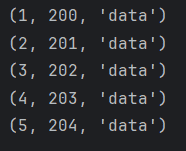
Example: A PostgreSQL connection is established and autocommit mode is enabled to automatically save each SQL statement. A cursor is then used to insert records into the psy table, retrieve the stored data, and display the results, while handling any database-related errors.

Output:

👁 Screenshot-2026-06-18-094742

Explanation:

  • Establish a connection to the PostgreSQL database using psycopg.connect().
  • Enable autocommit mode so that every SQL statement is committed automatically.
  • Use a cursor object to execute SQL queries.
  • Insert records into the psy table inside a loop.
  • Retrieve and display all records using SELECT and fetchall().
  • Handle errors using a try-except block.

Transactional Context

  • A transactional context defines the scope within which database operations are executed as a single transaction.
  • It automatically manages the transaction lifecycle, including starting, committing, and rolling back transactions.
  • If all operations execute successfully, the transaction is committed; otherwise, it is rolled back.
  • Using context managers (with) simplifies transaction handling and helps maintain data consistency.
  • Transactional contexts are useful when multiple related database operations need to succeed or fail together.

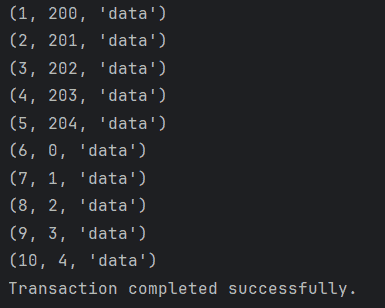
Example: A PostgreSQL connection and cursor are created using psycopg, and SQL queries are executed inside a transaction block. Changes are committed if all operations succeed; otherwise, the transaction is rolled back to maintain database consistency.

Output:

👁 Screenshot-2026-06-18-094855

Explanation:

  • Establish a connection to the PostgreSQL database using psycopg.connect().
  • Use conn.transaction() to create a transaction block.
  • Execute multiple SQL statements within the transaction.
  • If all operations succeed, the transaction is automatically committed.
  • If an error occurs, the transaction is automatically rolled back.
  • Context managers (with) automatically handle resource cleanup.

Transaction Characteristics

Transaction characteristics control how a transaction behaves while interacting with the database. In psycopg, these properties can be configured using connection attributes such as isolation_level, read_only, and deferrable. If they are not explicitly set, PostgreSQL uses the server's default settings.

1. Isolation Level

The isolation level determines how changes made by one transaction are visible to other concurrent transactions.

  • READ COMMITTED: Allows a transaction to view only committed changes. This is PostgreSQL's default isolation level.
  • REPEATABLE READ: Ensures a transaction sees a consistent snapshot of the database throughout its execution.
  • SERIALIZABLE: Provides the highest level of isolation by executing transactions as if they were run sequentially.
  • READ UNCOMMITTED: PostgreSQL treats this level as READ COMMITTED.

2. Deferrable

The deferrable property determines whether constraint checks can be postponed until the transaction is committed.

3. Read Only

The read_only property restricts a transaction to read operations only and prevents any modifications to the database.

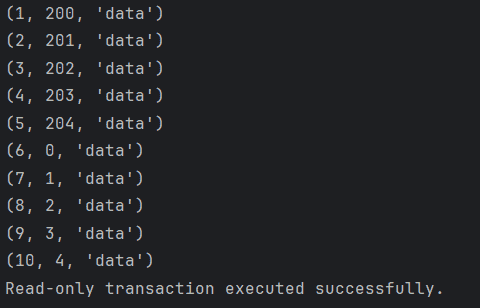
Example: A PostgreSQL connection is established using psycopg, and the connection is configured in read-only mode. A cursor is then used to execute SELECT queries and retrieve data from the psy table. Since the transaction is read-only, any attempt to modify the database using INSERT, UPDATE, or DELETE statements will result in an error.

Note: PostgreSQL does not support READ UNCOMMITTED separately and treats it as READ COMMITTED.

Output

👁 Screenshot-2026-06-18-095013

Explanation:

  • Establish a connection to the PostgreSQL database using psycopg.connect().
  • Enable read-only mode using conn.read_only = True.
  • Execute a SELECT query to retrieve data from the psy table.
  • Display the fetched records using fetchall().
  • Use a try-except block to handle any database-related errors.

Related Articles

PostgreSQL

Comment
Article Tags: