|
VOOZH | about |
|
VOOZH | about |
In Pandas DataFrames, applying conditional logic to filter or modify data is a common task. Let's explore different ways to apply an 'if condition' in Pandas DataFrame.
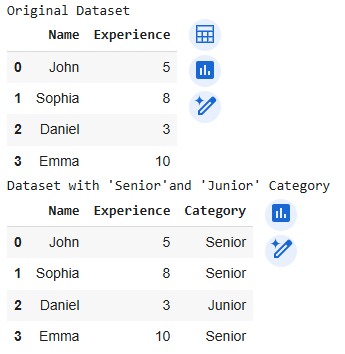
We can apply an "if condition" by using apply() with a lambda function. This allows you to apply a custom function row-wise or column-wise to your DataFrame.
Let's consider a Pandas DataFrame where we have employee data and we want to categorize employees based on their years of experience.
Output:
np.where() for Conditional Column AssignmentFor conditional logic, np.where() is often faster than apply() and can be used to return one value when the condition is true, and another when it's false. This method is vectorized, making it more efficient for large DataFrames..
In this example, we will categorize students based on their exam scores into "Passed" and "Failed."
Output:
 Student Score Result
0 Alice 75 Passed
1 Bob 40 Failed
2 Charlie 85 Passed
3 David 60 Passed
loc[] for Applying 'If Condition' loc[] method is useful for conditionally selecting rows based on specified criteria. In this example, we'll classify products as "Expensive" or "Affordable" based on their price.
Output:
 Product Price Price_Category
0 Laptop 1200 Expensive
1 Phone 600 Expensive
2 Tablet 300 Affordable
3 Smartwatch 200 Affordable
query() method is a great tool for filtering rows based on multiple conditions. In this example, we filter employees based on both their years of experience and salary.
Output:
 Employee Experience Salary
0 John 6 55000
2 Daniel 7 65000
The mask()method is used to replace values where the condition is True. It is useful when you want to make changes based on a condition while keeping the rest of the data intact. Let’s use it to flag negative values in a financial dataset as "Invalid."
Output:
 Account Balance Status
0 A1 1500 1500
1 A2 -250 Invalid
2 A3 3200 3200
3 A4 -500 Invalid
In this case, negative balances are flagged as "Invalid."
Let's consider a task to apply conditional logic: if the name is equal to "Ria," we assign the value "Found"; otherwise, we assign "Not Found."
Output:
 First_name Status
0 Hanah Not Found
1 Ria Found
2 Jay Not Found
3 Bholu Not Found
4 Sachin Not Found