 |
VOOZH | about |
|
VOOZH | about |
Many users believe Chrome’s Incognito Mode keeps their browsing completely private, but that’s only partially true. According to Kaspersky, 40% of users rely on incognito, and with Chrome used by over 68% of people worldwide, this misconception is widespread. While Incognito prevents Chrome from saving history, cookies, and site data, your activity can still be visible at the device, network, or ISP level.
Chrome doesn’t save your browsing history in Incognito, but Windows keeps DNS cache logs that can reveal visited websites.
Below are the steps mentioned to see the incognito history. Follow them properly.
Step 1:
👁 How-to-Check-Incognito-History-on-Windows_1
Step 2:
ipconfig /displaydns👁 How-to-Check-Incognito-History-on-Windows_2-(1)
Step 3:
👁 How-to-Check-Incognito-History-on-Windows_3-(1)
To delete that history, you have to perform the following steps:
Step 1:
Step 2:
ipconfig /flushdns
👁 How-to-Delete-Incognito-History-on-Windows_1-(1)
Step 3:
👁 How-to-Delete-Incognito-History-on-Windows_2-(1)
After completing the section for Windows devices, it is time to understand the process of viewing and Removing Chrome Incognito History on Phone. We will start with the steps required for viewing Chrome History on Android.
You can only view it using third party monitoring or parental control apps like:
Warning: These apps often track more data than needed and may affect privacy. Use carefully.
You can clear the DNS cache through Chrome’s internal settings.
Step 1:
Step 2:
Type the following in the address bar:
chrome://net-internals/#dns
👁 How-to-Delete-Incognito-History-on-Android_1-(1)
Step 3:
👁 How-to-Delete-Incognito-History-on-Android_2-(1)
Step 4:Exit from Chrome.
This removes DNS records linked to your Incognito browsing.
As we are approaching the end of the topic, let us have a look at the process to See and Clear Incognito Chrome History on Apple operating systems. We will start with the Incognito History Checking of MacOS.
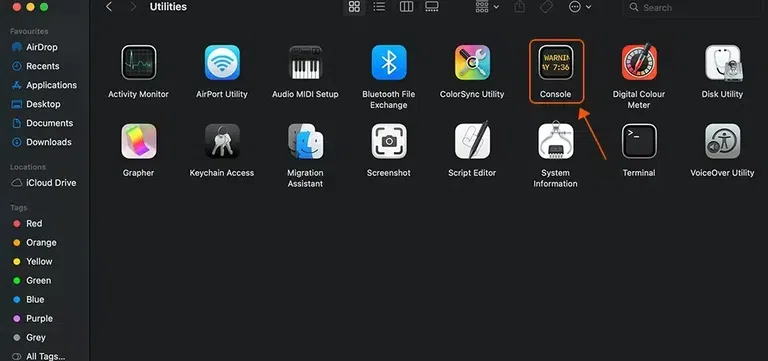
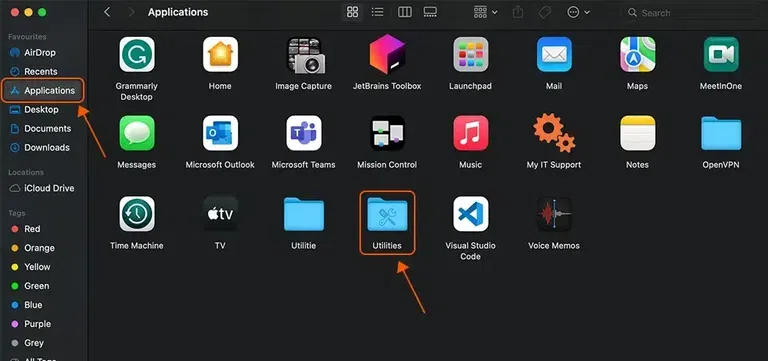
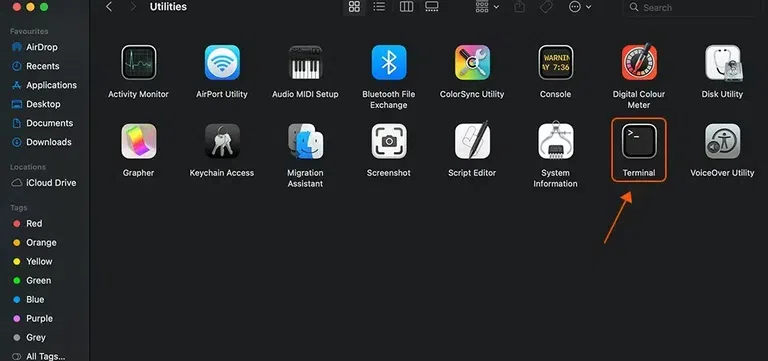
Below are the mentioned steps to view the Incognito History on macOS
Step 1:
👁 How-to-Check-Incognito-History-on-MacOS_1
Step 2:
👁 How-to-Check-Incognito-History-on-MacOS_2
Step 3:
👁 How-to-Check-Incognito-History-on-MacOS_3
Step 4:
👁 How-to-Check-Incognito-History-on-MacOS_4
Step 5:
👁 How-to-Check-Incognito-History-on-MacOS_5
Step 6:
👁 How-to-Check-Incognito-History-on-MacOS_6
Below are the mentioned steps, which will help you in deleting the Incognito History on macOS.
Step 1:
👁 How-to-Delete-Incognito-History-on-MacOS_1
Step 2:
👁 How-to-Delete-Incognito-History-on-MacOS_2
Step 3:
👁 How-to-Delete-Incognito-History-on-MacOS_3
This clears the macOS DNS cache and removes traces of Incognito browsing.
iOS doesn’t show Chrome Incognito history directly, but DNS records may appear in Safari settings.
Step 1:
👁 How-to-Check-Incognito-History-on-iPhone_1-(1)
Step 2:
👁 How-to-Check-Incognito-History-on-iPhone_2-(1)
Step 3:
👁 How-to-Check-Incognito-History-on-iPhone_3-(1)
Two quick ways to clear DNS records:
This clears DNS cache automatically.
This also flushes DNS cache.
👁 How-to-Delete-Incognito-History-on-iPhone_1-(1)
Many of us might think that the browsing history in incognito mode is not retrieved at all, but this is not true. Incognito Mode does not store:
However, it does not hide your activity from:
Note: You can check out this detailed article on How to Delete Incogonito History.
There are ways in the Windows Operating System by which we can see our incognito history:
Following are the ways by which you can privately browse the web in the Incognito Mode:
Incognito alone is not enough. Here are essential steps:
1. Use Private Browsers: They block trackers and keep sessions anonymous.
2. Use a Good VPN: Encrypts your connection and hides your online activity (We also have a list of the Top 10 VPNs and Free VPN options.).
3. Disable Location Tracking: Browsers often share location via IP address disable this in settings.
4. Block Browser Cookies: Especially third-party cookies, which track your identity across websites.
5. Disable Tailored Ads: Social media platforms heavily track browsing behavior for ad targeting.


.png)
.png)
.png)
.png)
.webp)
.webp)




.webp)
.webp)
.webp)
.webp)