
Apple Watch User Guide
- Welcome
- What’s new
- Run with Apple Watch
-
- Alarms
- Audiobooks
- Blood Oxygen
- Calculator
- Calendar
- Camera Remote
- ECG
- Medications
- Memoji
- Music Recognition
- News
- Now Playing
- Remote
- Shortcuts
- Siren
- Stocks
- Stopwatch
- Tides
- Timers
- Use the Tips app
- Translate
- Vitals
- Voice Memos
- Walkie-Talkie
- World Clock
- Copyright and trademarks
View your sleep score on Apple Watch
In the Sleep app 👁 Image
, you can view a sleep score—a score based on estimates of how long you slept, the consistency of when you fell asleep relative to your recent history, and the amount and duration of awake periods during sleep. Your sleep score appears after you wake up.

After your sleep is analyzed, you are given a score ranging from 0-100, with a classification and a detailed breakdown to help you understand how to make your sleep more restorative.
For more information on sleep tracking, see the Apple Support article Track your sleep on Apple Watch and use Sleep on iPhone.
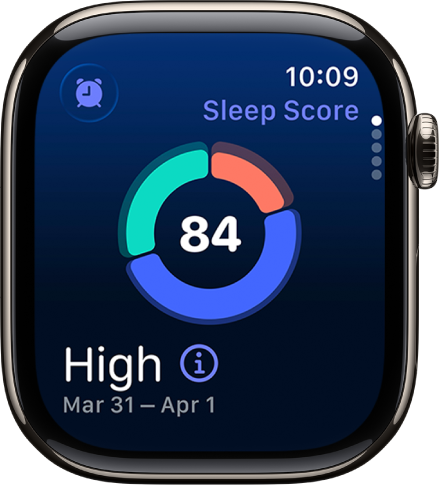
To view your sleep score, do the following:
Go to the Sleep app 👁 Image
on your Apple Watch.To learn more about your sleep score, tap 👁 the Info button
.

Your sleep score is calculated based on estimates of sleep duration (50 points), bedtime consistency (30 points), and interruptions (20 points). Your total score ranges from Very Low to Very High, with the following breakdown:
Very Low: 0-40
Low: 41-60
OK: 61-80
High: 81-95
Very High: 96+
Note: Bedtime consistency considers when you fell asleep during the last 13 nights. Interruptions considers how often you wake up and how long you stay awake during your sleep.