
Time events with a stopwatch on Apple Watch
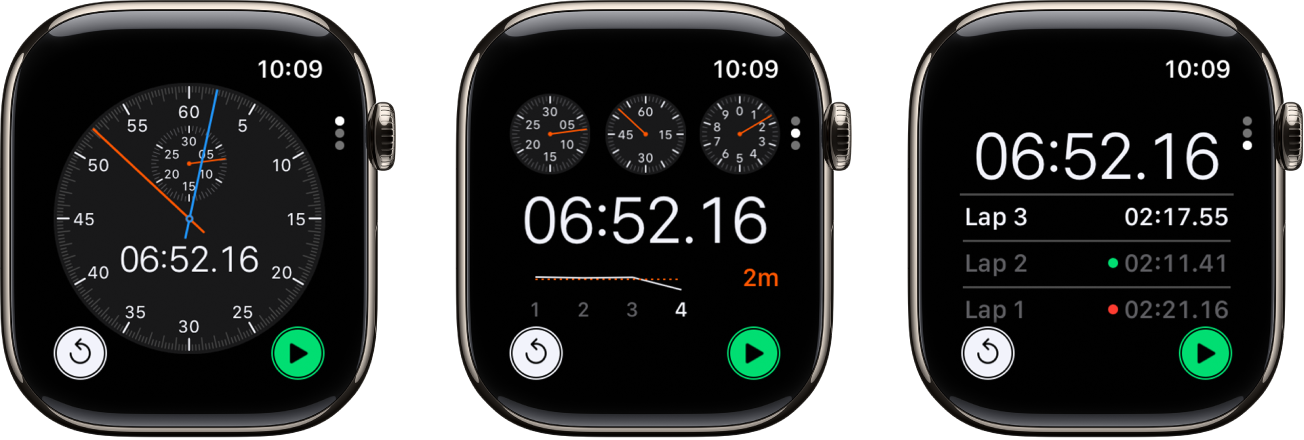
Time events with accuracy and ease. Apple Watch can time full events and keep track of lap or split times, then show the results as a list, a graph, or live on your watch face. The Chronograph Pro watch face has the stopwatch built in.
Open and choose a stopwatch
Go to the Stopwatch app 👁 Image
on your Apple Watch, or tap the stopwatch on your watch face (if you’ve added it or you’re using the Chronograph Pro watch face).To choose a different format, turn the Digital Crown.
You can choose Analog, Hybrid, or Digital.

Start, stop, and reset the stopwatch
Go to the Stopwatch app 👁 Image
on your Apple Watch.Turn the Digital Crown to choose a format, then do any of the following:
Start: Tap 👁 the Start button
.Record a lap: Tap 👁 the Lap button
.Record the final time: Tap 👁 the Stop button
.Reset the stopwatch: With the stopwatch stopped, tap 👁 the Reset button
.


The timing continues even if you switch back to the watch face or open other apps.
Note: On supported models, when you turn on Always On Display, the stopwatch updates once a second when your wrist is down. To turn on Always On Display, go to the Settings app 👁 Image
, tap Display & Brightness, then turn on Always On Display.

Review results on the display you used for timing, or change displays to analyze your lap times and fastest/slowest laps (marked with green and red) in the format you prefer.