|
VOOZH | about |
|
VOOZH | about |
Bootstrap 5 Carousel transition can be customized with the help of the SASS variables that help to set the duration of the transition. The transform transition will need to be defined first if multiple transitions are implemented. In other words, the transition can be set to a custom setting using the $carousel-transition-duration and $carousel-transitionSASS variables. For this, we have to get the SASS version and change the variable's values there.
Step 1: Install Bootstrap using the following command:
npm i bootstrapStep 2: Create your custom SCSS file and write the variable you want to override. Then include the bootstrap SCSS file using import.
$variable_to_override: value
@import "../node_modules/bootstrap/scss/bootstrap.scss";
Step 3: Convert the SCSS file to CSS using a live server extension.
Step 4: Include the CSS file in your HTML file.
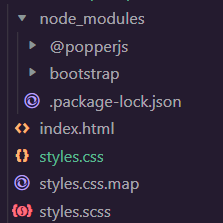
<link rel="stylesheet" href="style.css">Project Structure:
$variable_to_override: valueExample 1: The code below demonstrated how to change and manipulate the $carousel-transition-duration and $carousel-transition variables to change the carousel's animation. The carousel which is implemented is a carousel with slides only.
Output:
Example 2: The code below demonstrated how to reduce the $carousel-transition-duration and change $carousel-transition variables to change the carousel's animation. The carousel which is implemented is a carousel with text and images and has a carousel-fade class which adds a fading transformation.
Output:
Reference: https://getbootstrap.com/docs/5.0/components/carousel/#custom-transition