|
VOOZH | about |
|
VOOZH | about |
Bootstrap5 Flex Align Self property is used to change each item's alignment individually on the cross-axis. By default, it starts from the y-axis, if we want to change the alignment on the x-axis change the value of the class flex-direction to the column. There are some classes that can be used to set the alignment.
Flex Align Self class:
Syntax:
<div class="align-self-*-**">
 ...
</div>
The ** can be replaced by start/end/baseline/stretch where,
The '*' can be replaced by sm/md/lg/xl/xxl for making the content responsive to different screen sizes and the '**' can be replaced with the above-mentioned Flex Align Self classes.
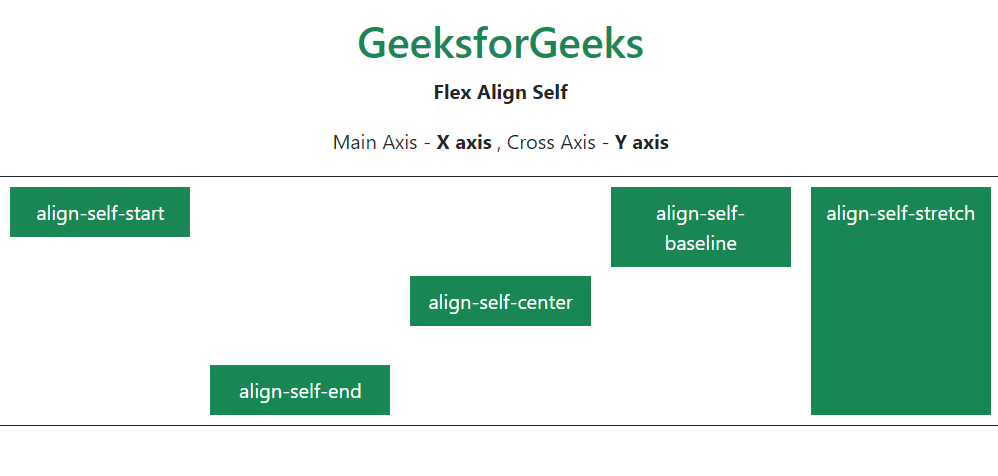
Example 1: In this example, the flex-direction is set to row. Hence, the main axis is the X axis and the cross axis is the Y axis. As a result, the flex items will be aligned with respect to the cross-axis when an align-self property is set.
Output:
Example 2: This is the example in which the flex-direction is set to the column. Hence, the main axis is the Y axis and the cross axis is the X axis. As a result, the flex items will be aligned with respect to the cross-axis when an align-self property is set.
Output:
Reference: https://getbootstrap.com/docs/5.0/utilities/flex/#align-self