|
VOOZH | about |
|
VOOZH | about |
Bootstrap 5 Modal Change animation facilitates several variables that determine the animation transformation state of the modal, along with setting the zoom-in & zoom-out animation for the modal. The Modal opens with a fade-in animation when it is triggered using a button, although, this animation can be changed by customizing the SASS variables. The $modal-fade-transform variable can be changed to some other customized values to change the animation of the modal when triggered. For this, we have to get the SASS version and change the variables' values there.
Modal Change animation variables:
Steps to override SCSS of Bootstrap:
Step 1: Install Bootstrap using the following command
npm i bootstrapStep 2: Create your custom SCSS file and write the variable you want to override. Then include the bootstrap SCSS file using import.
$variable_to_override: value
@import "../node_modules/bootstrap/scss/bootstrap.scss";
Step 3: Convert the SCSS file to CSS using a live server extension.
Step 4: Include the CSS file in your HTML file.
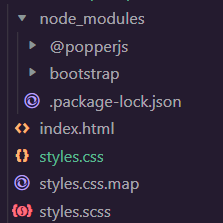
<link rel="stylesheet" href="style.css">Project Structure: The following project structure will be displayed after completing the above process:
Syntax:
$variable_to_override: valueExample 1: The code below demonstrated how to change and manipulate the $modal-fade-transform variable to change the modal's animation. The modal which is used is a modal with a Grid.
Output:
Example 2: The code below demonstrated how to change and manipulate the $modal-fade-transform and $modal-transition variables to change the modal's animation. The modal which is used is a modal with a Dynamic Height:
Output:
Reference:https://getbootstrap.com/docs/5.0/components/modal/#change-animation