|
VOOZH | about |
|
VOOZH | about |
Changing the Bootstrap datepicker to a specific date format allows you to customize how the selected date is displayed. This is done by specifying the desired format using the format option in the datepicker initialization, ensuring the date appears in the preferred style (e.g., "dd/mm/yyyy").
Below are some examples with different date formats.
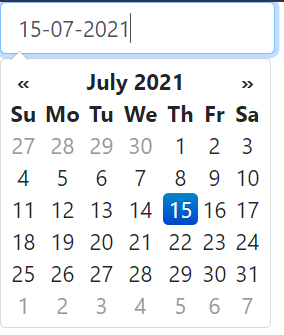
In this example, we integrate Bootstrap Datepicker with a specific format (dd-mm-yyyy). It uses jQuery to initialize the datepicker on an input field, allowing users to select dates in the specified format.
Output:
👁 ImageIn this example we use Bootstrap Datepicker with the date format yyyy-mm-dd. It initializes the datepicker on an input field via jQuery, allowing users to select and display dates in the specified year-month-day format.
Output:
👁 ImageIn this example we use Bootstrap Datepicker with the date format dd/mm/yyyy. Using jQuery, it initializes the datepicker on an input field, allowing users to select dates in day/month/year format.
Output:
👁 ImageIn this example we use Bootstrap Datepicker with the format yyyy/mm/dd. It initializes the datepicker using jQuery on an input field, allowing users to select dates in the year/month/day format for easier input.
Output:
👁 Image