|
VOOZH | about |
|
VOOZH | about |
Unlike numerical data, categorical data represents discrete values or categories such as gender, country or product type. Machine learning algorithms require numerical input, making it essential to convert categorical data into a numerical format. This process is known as encoding. Categorical data is a common in many fields like marketing, finance and social sciences
In this article we will use different encoding techniques to convert categorical data.
Here we will load pandas and scikit learn library. After that we can load our dataset.
We can download dataset from here.
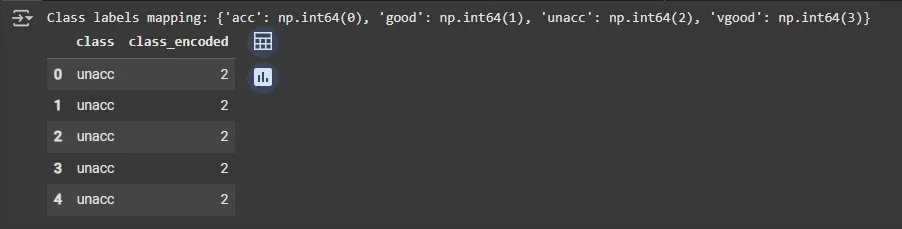
Here we will use Label encoding converts each category into a unique integer, making it suitable for ordinal data or when models need numeric input.
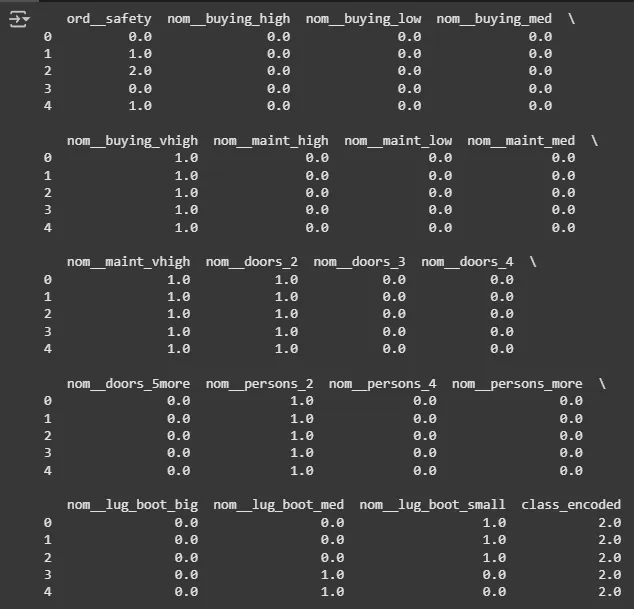
Now we will use One-Hot encoding which creates separate binary columns for each category, ideal for nominal data with no natural order.
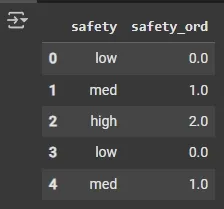
Ordinal encoding is used for features where order matters like low < med < high. Explicitly supplies category order to ensure model sees the true underlying order.
Transformed shape: (1728, 19)
Output:
Here we will see a quick difference between Label Encoding, One-Hot Encoding and Ordinal Encoding.
| Parameter | Label Encoding | One-Hot Encoding | Ordinal Encoding |
|---|---|---|---|
| Definition | Converts each category into a unique integer | Converts categories into binary vectors | Assigns integers to categories based on order |
| Output Type | Integer values | Binary vector (0/1) | Integer values respecting order |
| Suitable For | Ordinal data | Nominal data | Ordinal data |
| Introduces Ordinality | Yes (may be misleading for nominal data) | No | Yes |
| Dimensionality | Low (single column) | High (number of unique categories becomes columns) | Low (single column) |
| Working | Each category become unique integer | Each category become new binary column | Categories become ordered integers |
| Use Case | Algorithms that can handle ordinal integers | Algorithms that cannot handle categorical data | Ordered categories (e.g., rating levels) |
| Speed / Efficiency | Fast | Slower for high cardinality | Fast |