LightGBM (Light Gradient Boosting Machine) is an open-source gradient boosting framework designed for efficient and scalable machine learning. It works for both structured and unstructured data and is optimized for speed and memory usage.
Handles large datasets with millions of rows and columns Supports parallel and distributed computing Uses histogram-based techniques and leaf-wise tree growth for efficiency Provides options like Exclusive Feature Bundling (EFB) and Gradient-based One-Side Sampling (GOSS) for faster computation and reduced memory usage Working of LightGBM LightGBM builds trees leaf-wise (splitting the leaf with the highest gain) rather than level-wise, which can improve accuracy but may overfit smaller datasets.
Uses histograms to bucket continuous values and reduce computations Leaf-wise tree growth selects splits with maximum gain Exclusive Feature Bundling reduces feature dimensionality GOSS prioritizes instances with larger gradients to improve learning efficiency Implementation of LightGBM We will implement regression using LightGBM, covering library installation, data loading, preprocessing, training and evaluation.
1. Installing Libraries We will install LightGBM for regression tasks.
pip install lightgbm==3.3.5 installs a specific version compatible with our notebook !pip install lightgbm==3.3.5
2. Importing Libraries and Dataset We will import the necessary Python libraries such as pandas , numpy , seaborn , matplotlib , sklearn and load the dataset.
The used dataset can be downloaded from here .
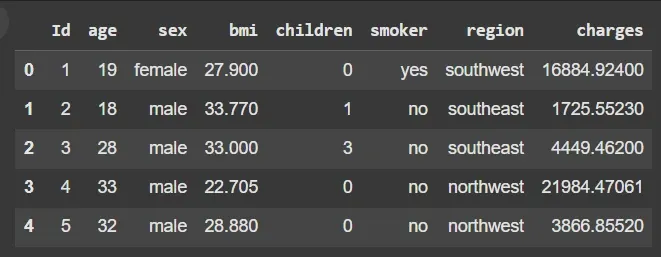
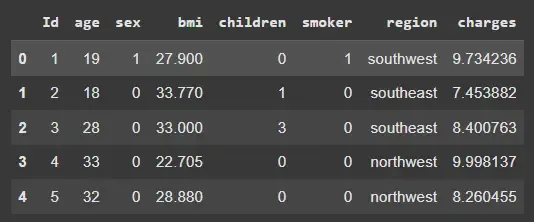
2.1. Previewing the Dataset We will check the first few rows to understand the data structure.
df.head(): Displays the first five rows for a quick preview Output:
👁 Screenshot-2025-09-05-172711 Dataset 2.2. Dataset Shape We will check the dimensions of the dataset.
df.shape: Returns the number of rows and columns Output:
(1338, 8)
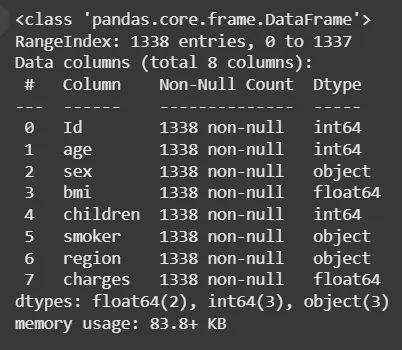
2.3. Dataset Information We will check the data types and null values.
df.info(): Displays column data types and counts of non-null values Output:
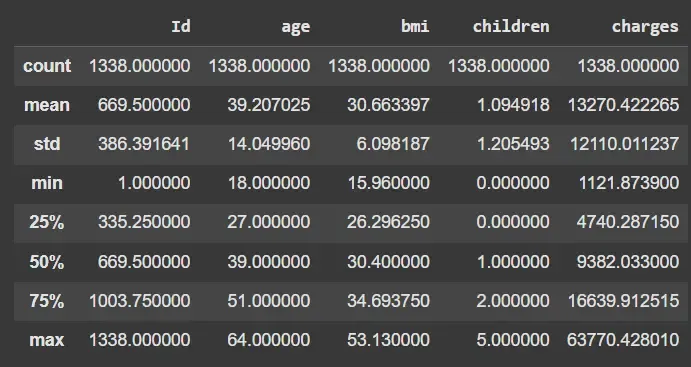
👁 Screenshot-2025-09-05-172705 Information of Dataset 2.4. Descriptive Statistics We will compute statistical summaries of numeric features.
df.describe(): Shows count, mean, std, min, max and percentiles Output:
👁 Screenshot-2025-09-05-172659 Description 3. Exploratory Data Analysis (EDA) We will analyze patterns, distributions and relationships among features.
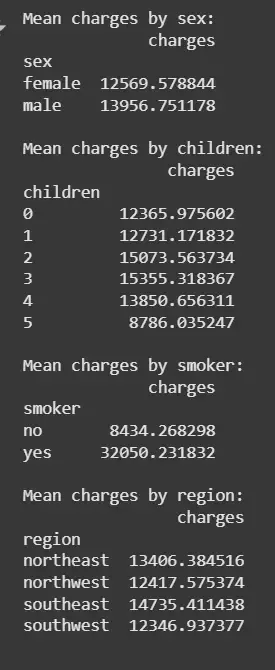
3.1: Mean Charges by Categorical Columns We will calculate average charges for each category in categorical features.
groupby(col).mean(): Computes mean charges per category Output:
👁 Screenshot-2025-09-05-172653 Mean Charges 3.2. Visualizing Categorical Distributions We will plot count distributions for categorical columns.
countplot(): Displays counts for each category Helps identify balance or skew in categorical features Output:
3.3. Visualizing Numerical Distributions We will plot histograms of numerical features to check skewness and spread.
histplot(): Plots distribution with optional KDE for density Output:
Insights from EDA We summarize the insights from EDA:
Men have slightly higher charges than women No clear trend between number of children and charges Smokers have significantly higher charges than non-smokers Charges vary slightly across regions 4. Data Preprocessing We will prepare the dataset by transforming the target variable and encoding categorical features for LightGBM regression.
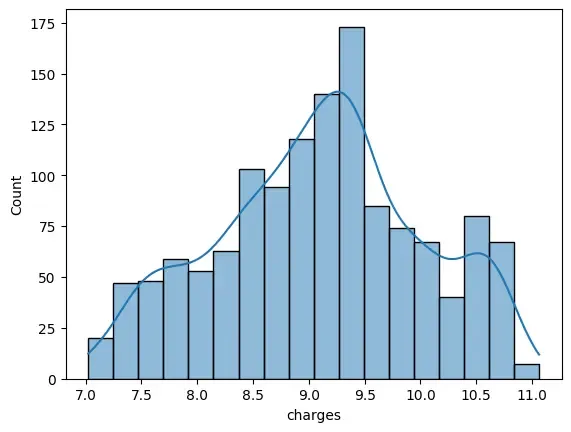
4.1. Log Transformation of Target Variable We will apply a logarithmic transformation to reduce skewness in the target variable (charges).
np.log1p() – Applies natural log after adding 1 to avoid log(0) Reduces skewness, helping the model learn patterns more effectively Output:
👁 download- Log Transformation 4.2. Binary Encoding of Categorical Features We will convert binary categorical columns (sex and smoker) into numeric format.
map() – Converts categories to 0/1 Ensures compatibility with LightGBM, XGBoost and other gradient boosting frameworks Output:
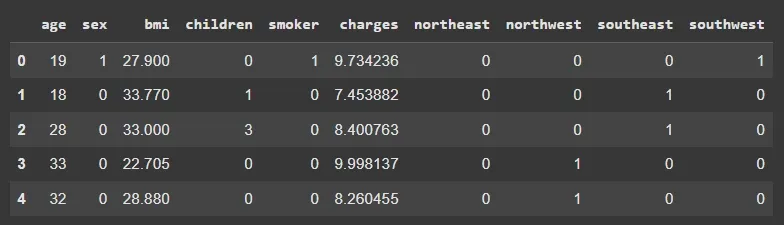
👁 Screenshot-2025-09-05-172602 Binary Encoding 4.3. One-Hot Encoding Multi-class Features We will one-hot encode the region column, converting it into separate binary columns.
pd.get_dummies() – Creates binary columns for each category Avoids ordinal bias that might be introduced with label encoding Output:
👁 Screenshot-2025-09-05-172556 One-Hot Encoding 5. Splitting and Scaling Data We will split the dataset into training and validation sets and scale the features.
train_test_split(): Splits features and target for training and validation StandardScaler(): Standardizes features for consistency 6. Dataset Preparation for LightGBM We will convert arrays into LightGBM dataset objects for training.
lgb.Dataset(): Prepares LightGBM-compatible datasets reference: Ensures validation data is consistent with training data 7. Regression Model Using LightGBM We will define model parameters and train the LightGBM regressor.
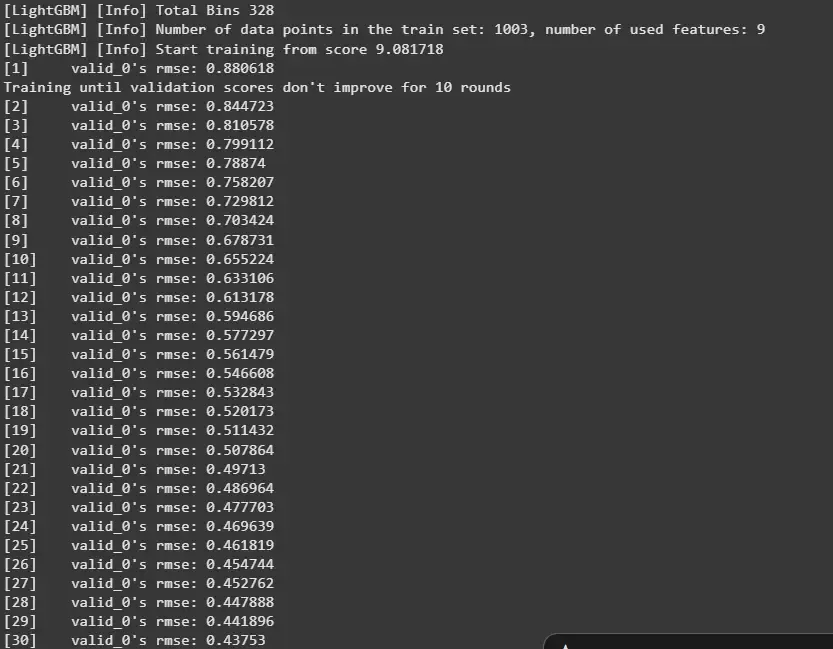
objective : Defines task (regression) metric : Evaluation metric (RMSE) boosting_type : GBDT (Gradient Boosting Decision Trees) num_leaves : Maximum leaf nodes per tree learning_rate : Step size for boosting feature_fraction : Fraction of features used per iteration early_stopping_rounds : Stops training if no improvement Output:
👁 Screenshot-2025-09-05-172548 Training 8. Prediction and Evaluation We will train the LightGBM regressor and evaluate its predictions.
LGBMRegressor(metric='rmse'): Initializes regressor fit() : Trains the model predict() : Generates predictions np.sqrt(mse()): Computes RMSE Output:
Training RMSE: 0.23318354433431218 Validation RMSE: 0.40587871797893876