|
VOOZH | about |
|
VOOZH | about |
Variational Autoencoders (VAEs) are generative models that learn a smooth, probabilistic latent space, allowing them not only to compress and reconstruct data but also to generate entirely new, realistic samples. VAEs capture the underlying structure of a dataset and produce outputs that closely resemble the original data.
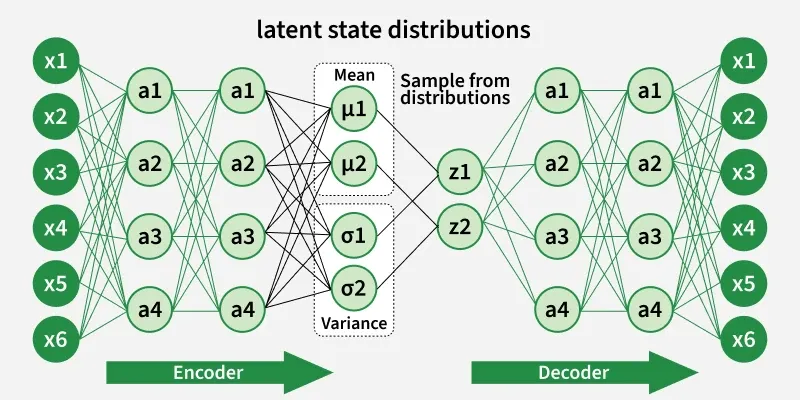
VAE is a special kind of autoencoder that can generate new data instead of just compressing and reconstructing it. It has three main parts:
The encoder takes input data like images or text and learns its key features. Instead of outputting one fixed value, it produces two vectors for each feature:
These two values define a range of possibilities instead of a single number.
Instead of encoding the input as one fixed point it pick a random point within the range given by the mean and standard deviation. This randomness lets the model create slightly different versions of data which is useful for generating new, realistic samples.
The decoder takes the random sample from the latent space and tries to reconstruct the original input. Since the encoder gives a range, the decoder can produce new data that is similar but not identical to what it has seen.
Variational autoencoder uses KL-divergence as its loss function the goal of this is to minimize the difference between a supposed distribution and original distribution of dataset.
Suppose we have a distribution and we want to generate the observation from it. In other words we want to calculate We can do it by following way:
But, the calculation of can be difficult:
This usually makes it an intractable distribution. Hence we need to approximate to to make it a tractable distribution. To better approximate to we will minimize the KL-divergence loss which calculates how similar two distributions are:
By simplifying the above minimization problem is equivalent to the following maximization problem :
The first term represents the reconstruction likelihood and the other term ensures that our learned distribution is similar to the true prior distribution . Thus our total loss consists of two terms one is reconstruction error and other is KL divergence loss:
We will build a Variational Autoencoder using TensorFlow and Keras. The model will be trained on the Fashion-MNIST dataset which contains 28×28 grayscale images of clothing items. This dataset is available directly through Keras.
First we will be importing Numpy, TensorFlow, Keras layers and Matplotlib for this implementation.
The sampling layer acts as the bottleneck, taking the mean and standard deviation from the encoder and sampling latent vectors by adding randomness. This allows the VAE to generate varied outputs.
The encoder takes input images and outputs two vectors: mean and log variance. These describe the distribution from which latent vectors are sampled.
Output:
Now we will define the architecture of decoder part of our autoencoder which takes sampled latent vectors and reconstructs the image.
Output:
Combine encoder and decoder into the VAE model and define the custom training step including reconstruction and KL-divergence losses.
Load the Fashion-MNIST dataset and train the model for 10 epochs.
Output:
Generate new images by sampling points from the latent space and display them.
Output:
Encode the test set images and plot their positions in latent space to visualize clusters.
Output:
We can see that our model is working fine.
You can download source code from here.