|
VOOZH | about |
|
VOOZH | about |
Express.js is a powerful framework for node.js. One of the main advantages of this framework is defining different routes or middleware to handle the client's different incoming requests. In this article, we will discuss, how to use the router in the express.js server.
The express.Router() function is used to create a new router object. This function is used when you want to create a new router object in your program to handle requests. Multiple requests can be easily differentiated with the help of the Router() function in Express.js.This is the advantage of the use of the Router.
Syntax:
express.Router( [options] )Optional Parameters:
Return Value: This function returns the New Router Object.>
Building your first router in Express.js is a fundamental step in backend development.
Installing Module:
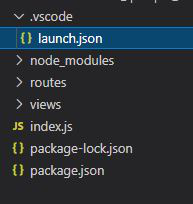
npm install expressProject structure: It will look like the following.
👁 ImageNow we will create all the routes:
Step 1: Inside route folder create Home.js file which will handle '/home' URL.
Step 2: Now we will create our second route which will be for login and will handle '/login' URL.
Step 3: Now inside the index.js file we will import all the created routes and use them.
Step to run the application: Open the terminal and run index.js using the below command:
node index.jsOutput: Open the browser and type localhost:3000 and handle the /home request by the client.