Node.js provides a global scope mechanism that allows certain variables and functions to be available across the entire application without explicit imports.
Browsers use the window object as their global scope.
Node.js replaces window with the global object.
The global object stores application-wide variables and functions.
These globals can be accessed from any file in the Node.js app.
Commonly used Global Objects in Node.js
Node.js provides a set of global objects that are available in every module. These are built-in objects that can be used directly in the application.
1. global
In Node.js, the global object provides a shared scope for variables and functions, similar to the window object in browsers.
global in Node.js serves the same purpose as window in browsers.
Variables and functions attached to global are accessible throughout the application.
It enables application-wide access without explicit imports.
Output
This is a global variable
2. console
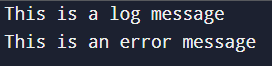
The console object in Node.js is used to output messages for logging and debugging purposes.
Prints messages to standard output (stdout) and error output (stderr).
Provides logging methods such as console.log(), console.error(), and console.warn().
Commonly used for debugging and monitoring application behavior.
Global objects in Node.js provide direct access to commonly used features without explicitly importing modules.
Reduce the need for require or import statements.
Allow easy access to frequently used functionality.
Simplify development by making core features readily available across the application.
Usage of Global Objects in Node.js
Global objects are helpful in situations where you need to access commonly used functionalities across your application. They are particularly useful for:
Managing the process: The process object gives you access to process-related information and the environment.
Working with file paths: __dirname and __filename help identify the current directory and file location, making it easier to manage relative file paths.
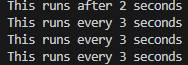
Timers and intervals: The setTimeout() and setInterval() functions are helpful for controlling the flow of your application.
Handling binary data: The Buffer object allows you to work with binary data efficiently.
Limitations of Global Objects in Node.js
While global objects are convenient, they should be used with caution. Over-relying on global objects can make your code harder to test and maintain. Here are some cases when you should avoid using global objects excessively:
Namespace Pollution: Global variables can cause naming conflicts and bugs.
Hidden Dependencies: Overuse of globals makes code harder to understand and debug.
Testing Issues: Globals are difficult to mock during testing.