|
VOOZH | about |
|
VOOZH | about |
Pug is a template engine that works with JavaScript libraries and frameworks. It simplifies the process of writing HTML by reducing traditional HTML syntax. It uses indentation to represent HTML structure. By using Pug you can reuse the HTML code. In this article, we will learn about how to use pug and its syntax examples.
Table of Content
Pug is a template engine that simplifies the HTML structure and is used to serve dynamic content. The pug file is denoted by the .pug extension. It doesn't require to close the tag.
Before using Pug, we need to install it in our project. we can install Pug using the package manager for NodeJS (npm).
npm install pug
Pug uses a simplified syntax for defining the document type and HTML tags.
doctype html
html
 head
 title My Pug Page
 body
 h1 Welcome to Pug
 p This is a Pug template.
Pug provides a short way to define classes, IDs, and attributes:
// " . " (dot) For class name, " # " For Id and Attributes are define inside round bracket
div.container#main-content
 p.text-info Welcome to Pug!
 img(src='image.jpg', alt='Pug Image')
In this syntax, div has the class container and the ID main-content. paragraph has the class text-info and the image has a source and alt attribute.
//Plain Text
p This is plain text in a paragraph.
//Text Block
p.
 This is a multiline
 text block in a paragraph.
// This is a single-line comment
//- This is another single-line comment
/*
 This is a
 multi-line comment
*/
Pug allows you to embed JavaScript code directly into the template. You can include variables, expressions, and control structures within your Pug code.
Buffered code outputs its result directly into the HTML, while unbuffered code does not. Buffered code is denoted by placing an equals sign (=) before the code, while unbuffered code uses a hyphen (-).
- let name = "Pug";
p Hello, #{name}! //- Unbuffered code
p= "This is buffered code." //- Buffered code
Interpolation is the process of embedding variables or expressions within the template. you can use #{...} for interpolation.
- let user = { name: "Jaimin", age: 21 };
p Welcome, #{user.name}! You are #{user.age} years old.
Pug supports iteration for rendering lists or arrays.
ul
 each item in ['Apple', 'Banana', 'Orange']
 li= item
Conditional statements can be implemented using if, else if, and else in Pug.
- let isAuthenticated = true;
if isAuthenticated
 p Welcome back!
else
 p Please log in.
Step 1: Create a NodeJS application using the following command:
npm init
Step 2: Install required Dependencies:
npm i pug express
The updated dependencies in package.json file will look like:
"dependencies": {
 "express": "^4.18.2",
 "pug": "^3.0.2"
}
Example: Below is an example of using Pug.
To run the application use the following command:
node index.js
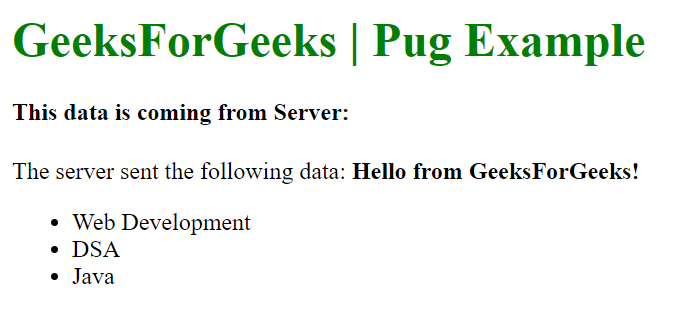
Output: Now go to http://localhost:3000 in your browser: