|
VOOZH | about |
|
VOOZH | about |
In the area of database management, effective data retrieval is essential particularly when handling large datasets. PostgreSQL offers the functionality of a cursor which allows for incremental data retrieval from extensive result sets.
By using PostgreSQL cursor syntax, developers can manage memory more efficiently and enhance application performance while processing rows one at a time. In this article, We will learn about the Cursor in PostgreSQL by understanding various examples and so on.
Syntax of Declaring a Cursor
DECLARE cursor_name CURSOR FOR query;After declaring a cursor, we can get the data using FETCH. The FETCH gets the next row(s) from the cursor. If no row found, then it returns NULL.
FETCH [direction (rows)] FROM [cursor_name];Let us take a look at an example of Cursor in PostgreSQL to better understand the concept.
Lets, create a sample table using the below commands for examples:
CREATE TABLE students (
 student_id serial PRIMARY KEY,
 full_name VARCHAR NOT NULL,
 branch_id INT
);
INSERT INTO students (
 student_id,
 full_name,
 branch_id
)
VALUES
 (1, 'M.S Dhoni', NULL),
 (2, 'Sachin Tendulkar', 1),
 (3, 'R. Sharma', 1),
 (4, 'S. Raina', 1),
 (5, 'B. Kumar', 1),
 (6, 'Y. Singh', 2),
 (7, 'Virender Sehwag ', 2),
 (8, 'Ajinkya Rahane', 2),
 (9, 'Shikhar Dhawan', 2),
 (10, 'Mohammed Shami', 3),
 (11, 'Shreyas Iyer', 3),
 (12, 'Mayank Agarwal', 3),
 (13, 'K. L. Rahul', 3),
 (14, 'Hardik Pandya', 4),
 (15, 'Dinesh Karthik', 4),
 (16, 'Jasprit Bumrah', 7),
 (17, 'Kuldeep Yadav', 7),
 (18, 'Yuzvendra Chahal', 8),
 (19, 'Rishabh Pant', 8),
 (20, 'Sanju Samson', 8)
Now that the table is ready we can declare our cursor.
Query:
BEGIN;
DECLARE
 my_cursor CURSOR FOR SELECT * FROM students;
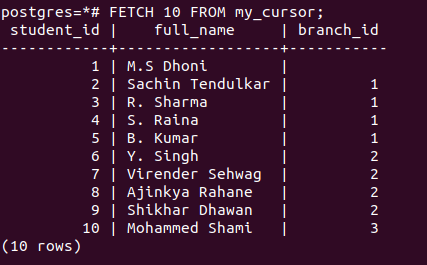
Fetch the data.
FETCH 10 FROM my_cursor;Output:
👁 PostgreSQL Cursor ExampleFETCH PRIOR FROM my_cursor;
FETCH PRIOR FROM my_cursor;
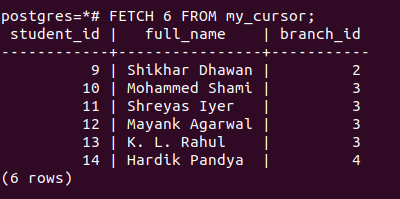
The above query will give you row 9 and 8 since right now our cursor is at 10;
FETCH 6 FROM my_cursor;Output:
👁 PostgreSQL Cursor ExampleCommit the transaction at the end.
COMMIT;