|
VOOZH | about |
|
VOOZH | about |
Unlike MySQL, PostgreSQL does not have a 'DESCRIBE'statement to view table column details. However, PostgreSQL provides several methods to access information about table columns.
In this article, we'll learn two effective ways to Describe Tables in PostgreSQL.
The 'psql' command-line interface in PostgreSQL offers commands to describe table structures. The information on various columns of a table can be achieved by any of the below commands.
\d or \d+
In this example, we will describe the table city of the sample database, ie, dvdrental:
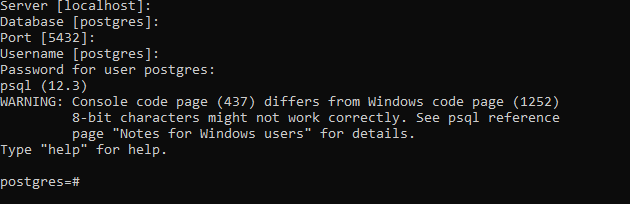
First, log into the PostgreSQL server using the pSQL shell:
👁 Using the pSQL shellNow shift to the dvdrental database using the below command:
\c dvdrental
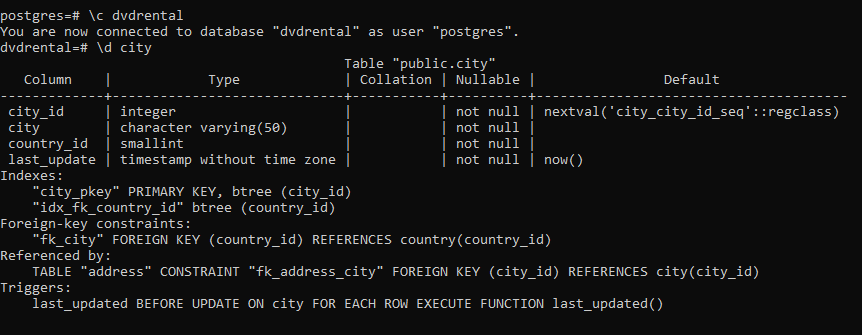
Now use the below command to describe the city table:
\d city;
This will result in the below:
👁 Using the pSQL shellThe below command can also be used for the same purpose:
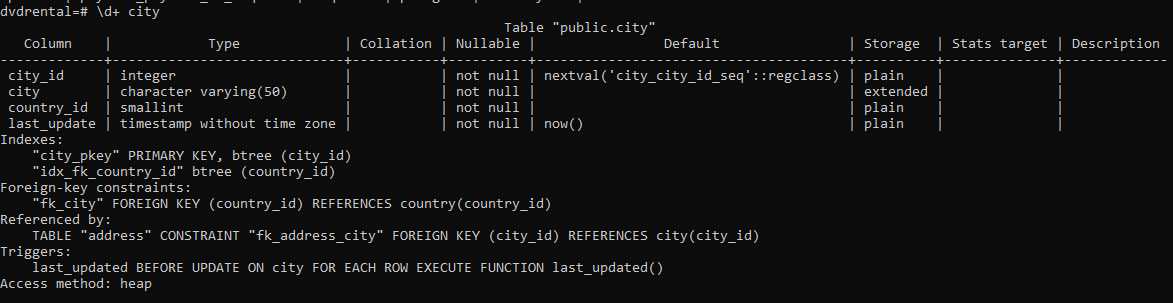
\d+ city
Output:
👁 Using the pSQL shellExplanation: The output of '\d city' or '\d+ city' will include columns, types, modifiers, and constraints.
The 'information_schema.columns' catalog contains the information on columns of all tables. To get information on columns of a table, you query the 'information_schema.columns' catalog.
SELECT
 table_name,
 column_name,
 data_type
FROM
 information_schema.columns
WHERE
 table_name = 'table_name';
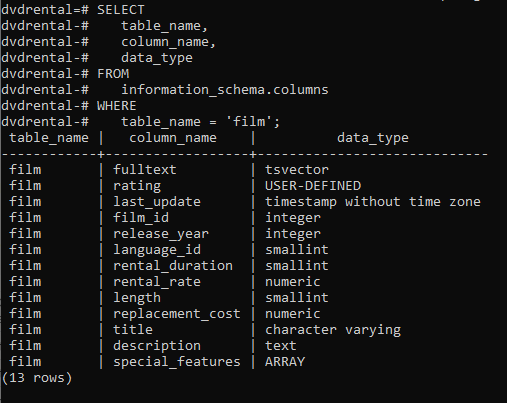
Use the below statement to get information on the film table of the dvdrental database.
Query:
SELECT
 table_name,
 column_name,
 data_type
FROM
 information_schema.columns
WHERE
 table_name = 'film';
Output:
👁 Using information_schemaExplanation: The result set will include columns such as 'table_name', 'column_name', and 'data_type', providing a clear overview of the table structure.