|
VOOZH | about |
|
VOOZH | about |
Desktop applications are software programs that run directly on an operating system without requiring a web browser. Python supports desktop application development through GUI frameworks such as Tkinter, PyQt, Kivy, and wxPython, allowing developers to build tools, utilities, and business applications with graphical interfaces.
Python is a popular choice for building desktop applications due to several reasons:
Python provides several GUI frameworks, each with its own strengths:
Each of these frameworks has its own use case, and choosing the right one depends on your project requirements.
Before we start building desktop applications with Python, we need to set up our development environment.
First, install Python from the official website: python.org. Ensure you check the option to add Python to the system PATH during installation.
To install python step-by-step follow our guide: Download and Install Python 3 Latest Version.
Python uses package managers to install and manage external libraries:
pip install PyQt5
It’s best practice to use a virtual environment to keep project dependencies isolated.
To create a virtual environment, follow our detailed guide: Create virtual environment in Python.
Once the environment is ready, you can install the required GUI framework and start building your desktop application.
Selecting the right GUI framework depends on your project’s needs. Here’s a quick guide to help you decide:
If you’re new to GUI development, Tkinter is a great starting point. If you need a more advanced UI, PyQt or wxPython might be better.
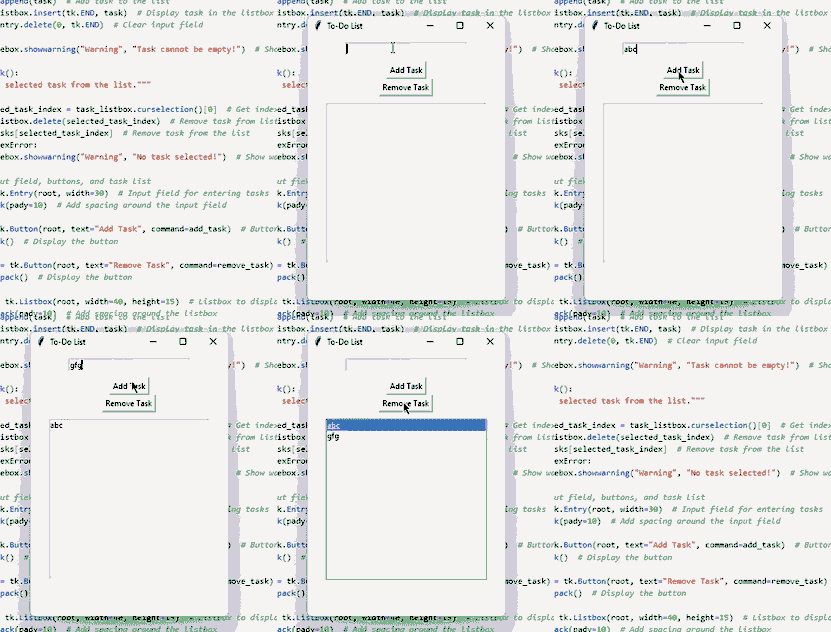
Let's build a To-Do List application using Tkinter. This app will allow users to add tasks and mark them as completed.
Storing Tasks in a List
Function to Add a Task
Function to Remove a Task
Creating Input Field, Buttons and Task List
Output:
Explanation:
Building a desktop application requires clean code, performance optimization, and a great user experience. Here are key practices to follow: