|
VOOZH | about |
|
VOOZH | about |
In this article, we are learning how to develop a chat application with multiple nodes and an answering bot made with OpenAI's text-davinci-003 [ChatGPT API ] model engine using Flet in Python.
Without using Flutter directly, programmers can create real-time web, mobile, and desktop apps using the Flet Python library. While creating apps with Flutter, developers must understand the Dart programming language, but by using the Flet module and simple Python code, we can create apps that function similarly to those created with Flutter.
For this tutorial, we will be using the Flet module and openai module [ChatGPT] of python. To install it using pip, run the following command in the terminal.
pip install flet
pip install openai
Source Code :
Code Explanation :
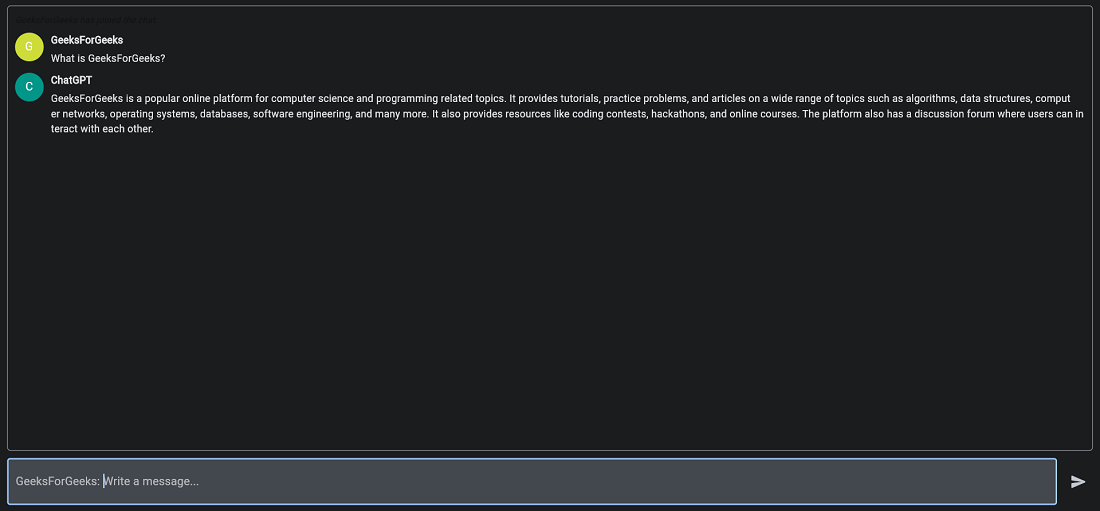
The Message class defines the structure of a message, and the ChatMessage class creates a graphical representation of a message that can be displayed in the chat. The main function defines the overall structure of the chat application, including the chat window, the new message entry form, and the functionality for sending messages and receiving responses from OpenAI's GPT-3 language model.
The chat application uses the flet library to create a graphical user interface, including text fields, buttons, and icons. The ft.app function starts a web server and renders the chat application in a web browser.
Note:
Add your own OpenAI Secret key from (https://platform.openai.com/account/api-keys) on line 88 of the code above.
To run the Flet application on the browser add this piece of code to the bottom of the code :
ft.app(port=any-port-number,target=main,view=ft.WEB_BROWSER)To run the Flet application as a desktop application add this piece of code to the bottom of the code :
ft.app(target=main)Output :
To learn more about Chat GPT, you can refer to: