|
VOOZH | about |
|
VOOZH | about |
In this article, we will learn how to fetch the JSON data from a URL using Python, parse it, and store it in an Excel file. We will use the Requests library to fetch the JSON data and Pandas to handle the data manipulation and export it to Excel.
The process of fetching JSON data from the URL and storing it in an Excel file can be broken down into three steps:
Install Required Library:
pip install requests pandas openpyxlPandas need openpyxl to interact with the Excel.
First, we need to import the necessary libraries.
import requests
import pandas as pd
Now, we will use the requests library to fetch the JSON data from the URL. For this example, we will use the placeholder API that returns the JSON data.
url = 'https://jsonplaceholder.typicode.com/todos'
response = requests.get(url)

# Check if the request was successful
if response.status_code == 200:
 json_data = response.json()
else:
 print(f"Failed to fetch data. HTTP Status code: {response.status_code}")
The JSON data can be stored in the json_data variable, which is typically the list of dictionaries. Each dictionary represents a row of data.
We will convert the JSON data into the pandas DataFrame which can be tabular data structure similar to the Excel spreadsheet.
df = pd.DataFrame(json_data)Finally, we will save the DataFrame to the Excel file using the to_excel method. We will specify the file name and the sheet name.
excel_file = 'todos.xlsx'
df.to_excel(excel_file, index=False, sheet_name='Todos')

print(f"Data has been successfully saved to {excel_file}")
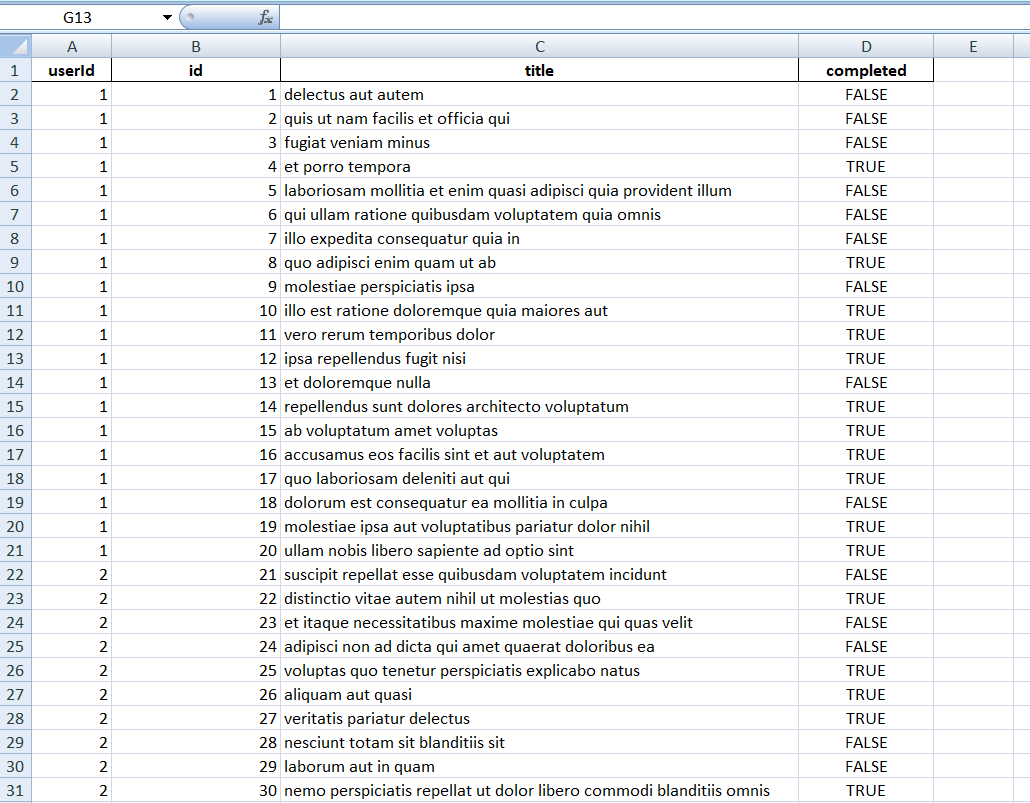
Output
In this article, we explored how to fetch the JSON data from the URL and store it in an Excel file using Python. We used the requests library to retrieve the JSON data, pandas to manipulate and structure the data into DataFrame and openpyxl to export the data to the Excel file.
This process can be commonly used in the data analysis, reporting and data integration the tasks, it can allowing you to easily convert the API data into the format that can be shared and analyzed using familiar tools like Excel. With this knowledge, we can now fetch and store the JSON data in the more accessible and structured format.