|
VOOZH | about |
|
VOOZH | about |
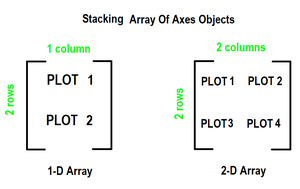
To create multiple plots use matplotlib.pyplot.subplots method which returns the figure along with the objects Axes object or array of Axes object. nrows, ncols attributes of subplots() method determine the number of rows and columns of the subplot grid.
By default, it returns a figure with a single plot. For each axes object i.e. plot we can set a title (set via set_title()), an x-label (set via set_xlabel()) and a y-label (set via set_ylabel()).
Let's see how this works:
Here, we have various Ways to Matplotlib create subplots in Python. Here, we are using some generally used Ways to Matplotlib create subplots in Python those are following.
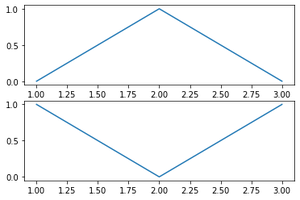
plt.subplots with 2D Array of SubplotsIn this example code utilizes Matplotlib to generate a figure with two subplots. The data, represented by arrays 'x,' 'y,' and 'z,' is plotted on separate axes within the figure. The resulting visualization displays distinct plots for the datasets 'y' and 'z' in the designated subplots.
Output
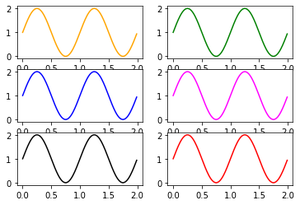
In this Python script, the Matplotlib library is imported and NumPy is used for numerical operations. Data for plotting sine waves is generated. The script then creates a 3x2 grid of subplots, each plotting the same sine wave with different colors (orange, green, blue, magenta, black and red).
Output
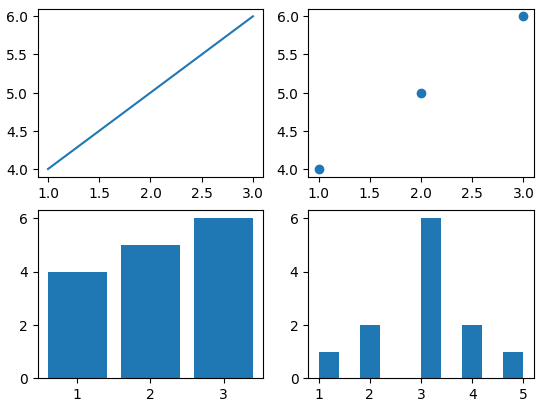
In this example Python script utilizes Matplotlib to create a 2x2 grid of subplots. Each subplot showcases a different type of plot: line plot, scatter plot, bar plot and histogram. The Axes objects are accessed through the 2D array 'axs,' and specific data is visualized in each subplot, demonstrating the flexibility of Matplotlib for diverse plotting needs.
Output