|
VOOZH | about |
|
VOOZH | about |
Here, we have a task to import multiple files from a folder in Python and print the result. In this article, we will see how to import multiple files from a folder in Python using different methods.
Below, are the methods of importing multiple files from a folder in Python.
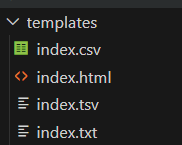
File structure :
 index.txt : GeeksforGeeks
 index.csv : GeeksforGeeks
 index.tsv : GeeksforGeeks
 index.html : <h1>GeeksforGeeks</h1>
In this code example, below code utilizes the `os` module to list files in the "templates" folder. It then iterates through the files, reads those with a ".txt" extension, and prints their content. The script uses the `open` function to access each file, reads its content.
Output
File: index.txt
Data:
GeeksforGeeks
==============================
In this example, below uses the glob module to create a list of CSV files in the "templates" folder. It then iterates through the list, opens each file, reads its content, and prints file information along with the data. The script employs the os.path.join function to construct the file path and displays a separator line after each file's data.
Output
File: templates\index.csv
Data:
GeeksforGeeks
==============================
In this example, below Python code the `Pandas` library to read multiple HTML files from the "templates" folder. It uses `glob` to create a list of HTML files, reads each file into a Pandas DataFrame, and concatenates them into a single DataFrame named `combined_data`. The final DataFrame can be further processed as needed, and its contents are printed.
Output
Empty DataFrame
Columns: [<h1>GeeksforGeeks</h1>]
Index: []