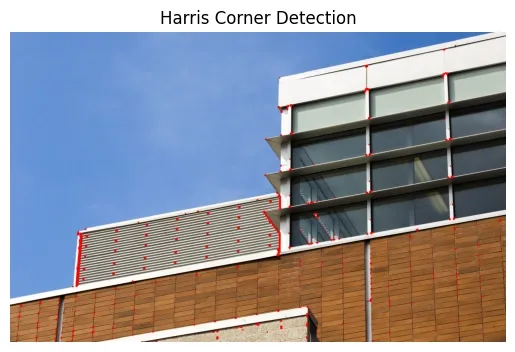
Python | Corner detection with Harris Corner Detection using OpenCV
Last Updated : 11 Jun, 2026
Corners are points in an image where the intensity changes significantly in multiple directions. They typically occur at the intersection of edges or at locations with strong variations in brightness, making them important feature points in image analysis and computer vision tasks.
Formed at intersections of edges or regions with abrupt intensity changes
Represent key structural points used for detecting and tracking image features
Harris Corner Detection Function in OpenCV
Harris Corner Detection is a computer vision technique used to detect corners by analyzing intensity changes in multiple directions. It identifies points with strong variations in pixel values, which are useful for feature-based analysis. In OpenCV, it is implemented using cv2.cornerHarris(), which computes a corner response for each pixel.
Measures intensity changes in multiple directions to locate corners
Generates a response map where higher values indicate stronger corner points
Function Syntax:
cv2.cornerHarris(src, blockSize, ksize, k)
Parameters:
src: Input grayscale image
blockSize: Neighborhood size used for corner detection
ksize: Aperture size for Sobel derivative calculation
k: Harris free parameter (typically 0.04–0.06)
borderType: Defines how image borders are handled during processing
Implementing
Let’s see how to implement Harris Corner Detection and highlight the corners detected in an image. Here we will be using OpenCV, Numpy and Matplotlib libraries for the implementation.
dest = cv2.cornerHarris(operatedImage, 17, 21, 0.01):Applies Harris corner detection, where 17 defines the neighborhood size, 21 sets the Sobel kernel size, and 0.01 is the Harris free parameter.
dest = cv2.dilate(dest, None):This enlarges the detected corners for better visibility using cv2.dilate().
image[dest > 0.01 * dest.max()] = [0, 0, 255]:Corners with responses greater than 1% of the max are marked red on the original image.