|
VOOZH | about |
|
VOOZH | about |
Rendering Django form fields manually allows full control over how each input element looks and behaves in the HTML.
A form provides three built-in methods to render fields:
These methods automatically generate HTML for the form, making quick form rendering straightforward.
Consider a project named 'geeksforgeeks' having an app named 'geeks'. In the geeks app, create a new file called forms.py to hold all form. In forms.py:
To render this form in a view, in views.py, create a home_view:
In the view, create an instance of the form class defined in forms.py.
Edit templates/home.html to render the form and display it to users:
Visit: http://localhost:8000/
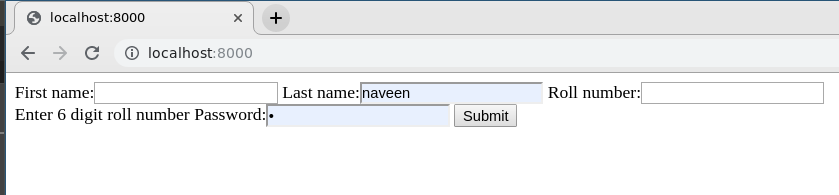
👁 create-django-formThe form works correctly, but the default visuals may be basic. To enhance the appearance, form fields can be rendered manually in the template. Each field is available as an attribute of the form using {{ form.field_name }}, and it will be rendered appropriately in a Django template.
Non-field errors can be displayed as follows:
Visually appealing form using Bootstrap 4 and custom CSS:
Visit: http://localhost:8000/ and check modified form.
The previous example showed basic styling using Bootstrap. Form fields can be customized further using various CSS techniques and methods to achieve advanced layouts and effects. Each field in a Django template is represented as a BoundField, which provides several useful attributes:
1. {{ field }}: Renders the form field as HTML.
2. {{ field.label }}: The label of the field, e.g., Email address.
3. {{ field.label_tag }}: The field’s label wrapped in the appropriate HTML tag, including the form’s label_suffix. Example:
<label for="id_email">Email address:</label>
4. {{ field.id_for_label }}: The ID used for the field (id_email in the example above). Useful for manually constructing labels or inline JavaScript without hardcoding the ID.
5. {{ field.value }}: The current value of the field, e.g., someone@example.com.
6. {{ field.html_name }}: The name attribute used in the input element. It respects the form prefix if one is set.
7. {{ field.help_text }}: Any help text associated with the field.
8. {{ field.errors }}: Outputs a <ul class="errorlist"> containing validation errors for this field.
{% for error in field.errors %}
<div class="error">{{ error }}</div>
{% endfor %}
9. {{ field.is_hidden }}: Returns True if the field is hidden, False otherwise. Useful for conditional checks
{% if field.is_hidden %}
{# Handle hidden fields differently #}
{% endif %}
10. {{ field.field }}: The Field instance from the form class that this BoundField wraps. It allows access to field attributes.
{{ char_field.field.max_length }}