VOOZH about

URL: https://www.geeksforgeeks.org/python/split-a-text-column-into-two-columns-in-pandas-dataframe/

⇱ Split a text column into two columns in Pandas DataFrame - GeeksforGeeks


  • Courses
  • Tutorials
  • Interview Prep

Split a text column into two columns in Pandas DataFrame

Last Updated : 30 Oct, 2025

In a Pandas DataFrame, a single column may contain multiple pieces of information—like full names, addresses, or codes—that are easier to work with when separated into individual columns.

This article demonstrates how to efficiently split a text column into two or more columns using Pandas.

Sample DataFrame


Output
 Name Age
0 John Larter 32
1 Robert Junior 34
2 Jonny Depp 36

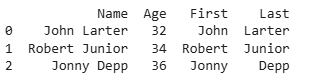
Method 1: Using str.split()

Output

👁 s11

Explanation:

  • str.split(): splits each string into a list.
  • expand=True: converts the list into separate columns.
  • Column names First and Last are assigned explicitly.

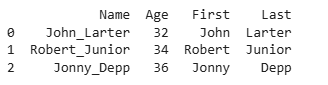
Method 2: Using a Custom Delimiter

Output

👁 s12

Explanation:

  • df.Name: selects the Name column.
  • .str.split("_"): splits each string in the column at the underscore _.
  • expand=True: converts the resulting list into separate columns instead of a list.

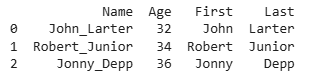
Method 3: Using apply() with pd.Series

Output

👁 s14

Explanation:

  • df.Name: accesses the Name column of the DataFrame.
  • apply(lambda x: ...): applies a function to each element of the column.
  • str(x).split("_"): converts the element to a string (if not already) and splits it at _.
  • pd.Series(...): converts the resulting list into a Series, so each part becomes a separate column.

Related Articles:

Comment