|
VOOZH | about |
|
VOOZH | about |
Given a dataset where multiple attributes are combined in a single string column, extract the individual values and split them into separate columns in a Pandas DataFrame using regex. For Example:
Input: "A: 0 B: 1 C: 2"
Output: A B C
0 1 2
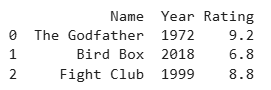
Below is the Sample DataFrame used in this article:
 movie_data
0 The Godfather 1972 9.2
1 Bird Box 2018 6.8
2 Fight Club 1999 8.8
Now, Let's explore different methods to split a string into columns using Regex.
This method uses regex groups to pull parts of each string into separate columns. Each captured group becomes one DataFrame column.
Output
👁 ImageExplanation:
This method extracts values using extract() and creates column names directly from the regex. The (?P<name>) syntax assigns column labels automatically.
Output
Explanation:
This method splits the string using str.split() at regex positions into multiple parts. expand=True turns the split parts into separate columns.
Output
Explanation:
This method finds all regex matches row-by-row using apply(). The results are converted into columns using a DataFrame.
Output
Explanation: