|
VOOZH | about |
|
VOOZH | about |
Pandas series is a One-dimensional ndarray with axis labels. The labels need not be unique but must be a hashable type. The object supports both integer- and label-based indexing and provides a host of methods for performing operations involving the index. Pandas
Series.truncate()
function is used to truncate a Series or DataFrame before and after some index value. This is a useful shorthand for boolean indexing based on index values above or below certain thresholds.
Syntax: Series.truncate(before=None, after=None, axis=None, copy=True) Parameter : before : Truncate all rows before this index value. after : Truncate all rows after this index value. axis : Axis to truncate. Truncates the index (rows) by default. copy : Return a copy of the truncated section. Returns : truncated Series or DataFrame.
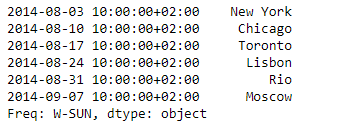
Example #1: Use Series.truncate() function to truncate some data from the series prior to a given date.
Output :
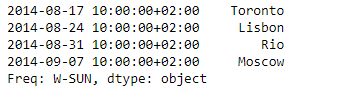
👁 ImageNow we will use Series.truncate() function to truncate data which are prior to '2014-08-17 10:00:00+02:00' in the given Series object.
Output :
👁 ImageAs we can see in the output, the Series.truncate() function has successfully truncated all data prior to the mentioned date.
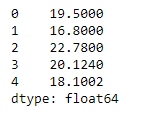
Example #2: Use Series.truncate() function to truncate some data from the series prior to a given index label and after a given index label.
Output :
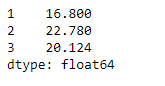
👁 Image Now we will use Series.truncate() function to truncate data which are prior to the 1st index label and after the 3rd index label in the given Series object.
Output :
👁 ImageAs we can see in the output, the Series.truncate() function has successfully truncated all data prior to the mentioned index label and after the mentioned index label.