|
VOOZH | about |
|
VOOZH | about |
In Pandas, sort_values() function sorts a DataFrame by one or more columns in ascending or descending order. This method is essential for organizing and analyzing large datasets effectively.
Syntax: DataFrame.sort_values(by, axis=0, ascending=True, inplace=False, kind='quicksort', na_position='last')
Parameter:
- by: Column name(s) to sort by (single or list).
- axis: 0 or 'index' for sorting rows; 1 or 'columns' for sorting columns.
- ascending: Boolean; True for ascending, False for descending.
- inplace: Boolean; if True, modifies the original DataFrame.
- kind: Sorting algorithm: 'quicksort', 'mergesort', or 'heapsort'.
- na_position: 'first' or 'last'; defines position of NaN values. Default is 'last'.
The output returns a sorted DataFrame with the same dimensions as the original.
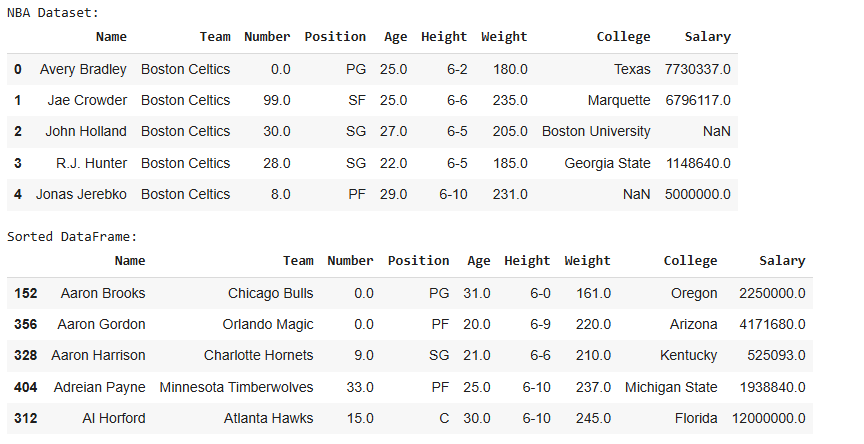
This example demonstrates how to sort a DataFrame by player names in ascending order.
Dataset Link: nba.csv
Output
In the sorted DataFrame, the rows are arranged alphabetically by player names. The index may appear jumbled because sorting affects the order of rows.
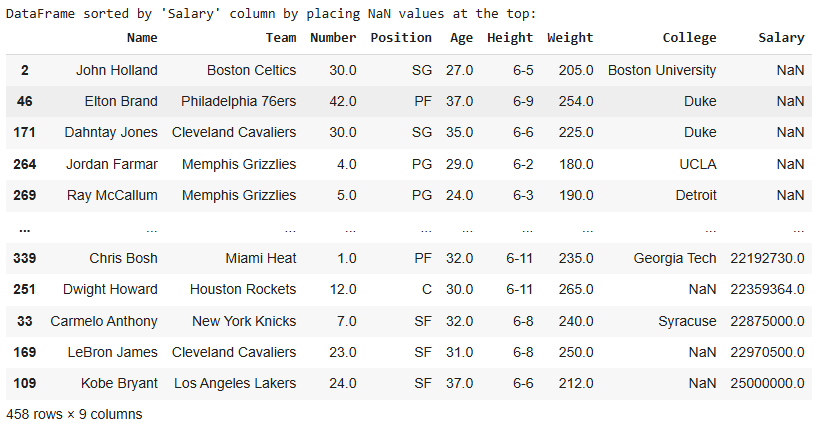
In this example, the DataFrame is sorted by the "Salary" column, with null values positioned at the top (instead of the default last).
Output
Here, NaN values in the 'Salary' column are placed at the top, followed by the sorted salary values.
Additionally, you can adjust the following parameters:
inplace parameter allows for modifying the original DataFrame directly, avoiding the need to assign the result to a new variable.kindparameter gives flexibility in choosing the sorting algorithm based on performance or requirements, such as 'quicksort', 'mergesort', or 'heapsort'.by parameter, enabling more complex sorting.The sort_values() function in Pandas is a versatile tool for sorting DataFrames by specific columns, with multiple options for handling null values and choosing sorting algorithms.