|
VOOZH | about |
|
VOOZH | about |
In boolean indexing, we will select subsets of data based on the actual values of the data in the DataFrame and not on their row/column labels or integer locations. In boolean indexing, we use a boolean vector to filter the data.
👁 ImageBoolean indexing is a type of indexing that uses actual values of the data in the DataFrame. In boolean indexing, we can filter a data in four ways:
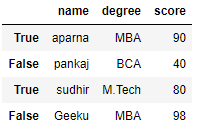
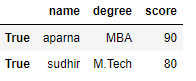
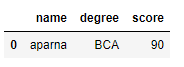
In order to access a dataframe with a boolean index, we have to create a dataframe in which the index of dataframe contains a boolean value that is "True" or "False".
Example
Output:
Now we have created a dataframe with the boolean index after that user can access a dataframe with the help of the boolean index. User can access a dataframe using three functions that is .loc[], .iloc[], .ix[]
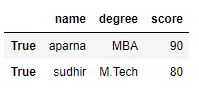
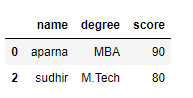
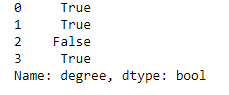
In order to access a dataframe with a boolean index using .loc[], we simply pass a boolean value (True or False) in a .loc[] function.
Output:
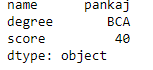
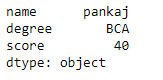
In order to access a dataframe using .iloc[], we have to pass a boolean value (True or False) but iloc[] function accepts only integer as an argument so it will throw an error so we can only access a dataframe when we pass an integer in iloc[] function
Code #1:
Output:
TypeError
Code #2:
Output:
In order to access a dataframe using .ix[], we have to pass boolean value (True or False) and integer value to .ix[] function because as we know that .ix[] function is a hybrid of .loc[] and .iloc[] function.
Code #1:
Output:
Code #2:
Output:
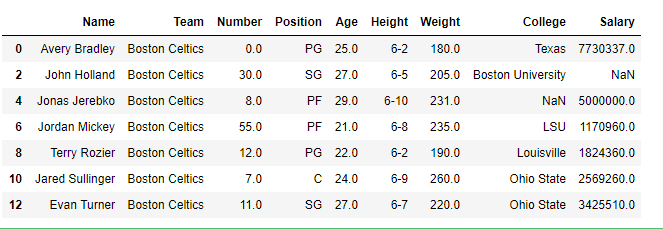
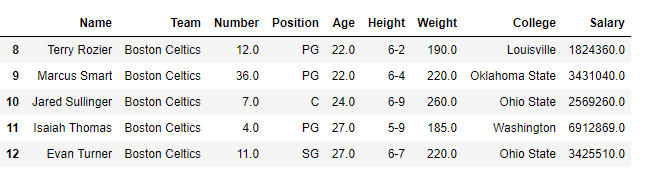
In a dataframe, we can apply a boolean mask. In order to do that we can use __getitems__ or [] accessor. We can apply a boolean mask by giving a list of True and False of the same length as contain in a dataframe. When we apply a boolean mask it will print only that dataframe in which we pass a boolean value True. To download "nba1.1" CSV file click here.
Code #1:
Output:
Code #2:
Output:
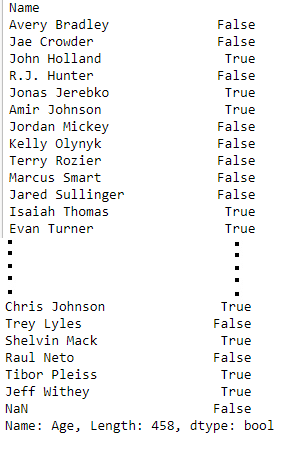
In a dataframe we can filter a data based on a column value. In order to filter data, we can apply certain conditions on the dataframe using different operators like ==, >, <, <=, >=. When we apply these operators to the dataframe then it produces a Series of True and False. To download the "nba.csv" CSV, click here.
Code #1:
Output:
Code #2:
Output:
Masking data based on index value :
In a dataframe we can filter a data based on a column value. In order to filter data, we can create a mask based on the index values using different operators like ==, >, <, etc... . To download "nba1.1" CSV file click here.
Code #1:
Output:
Code #2:
Output: