|
VOOZH | about |
|
VOOZH | about |
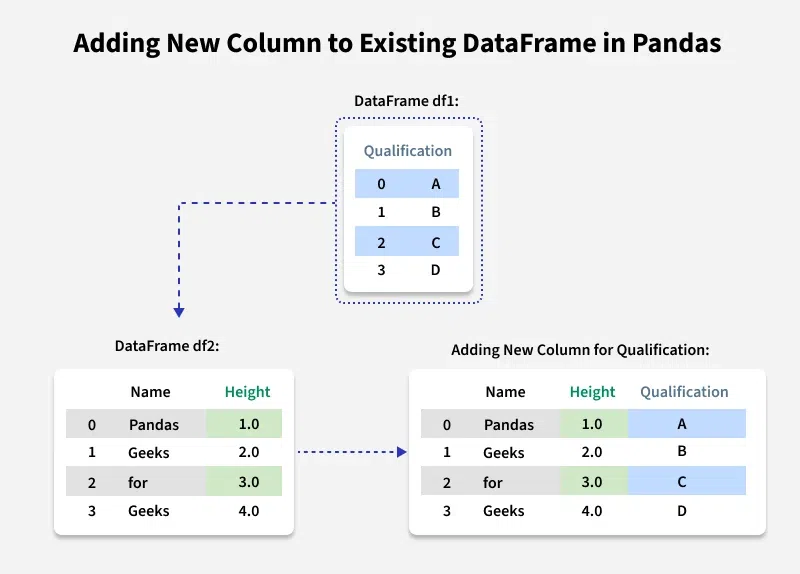
Adding a new column to a DataFrame in Pandas is a simple and common operation when working with data in Python. You can quickly create new columns by directly assigning values to them. Let's discuss how to add new columns to the existing DataFrame in Pandas. There can be multiple methods, based on different requirement.
Let's first create a dataframe. We will keep using this dataframe for all examples in this article.
We can simply add new column to the DataFrame with the specified list values. Note that the length of your list should match the length of index column, else it will show an error.
Output:
Note: Using list for adding column will modify the existing dataframe.
Table of Content
Adding New Column with assign() method creates a new DataFrame with the specified column(s) added. The original DataFrame remains unchanged unless we explicitly reassign the result back to it.
Output:
 Name Height Qualification Address address
0 Pandas 1 A New York NewYork
1 Geeks 2 B Chicago Chicago
2 for 3 C Boston Boston
3 Geeks 4 D Miami Miami
We can use a Python dictionary to add a new column in pandas DataFrame. This method is recommended when you want to add multiple columns at once or if you have columns in a dictionary format.
Output:
 Name Height Qualification Address
0 Pandas 1 A NewYork
1 Geeks 2 B Chicago
2 for 3 C Boston
3 Geeks 4 D Chicago
We can also use assign() method for adding Multiple columns at the same time by passing multiple key-value pairs (where the key is the column name and the value is the column data). It returns a new DataFrame, leaving the original one unchanged. We can achieve that using dictionary unpacking.
Output:
 Name Height Qualification Address  Age City
0 Pandas 1 A NewYork 21 NY
1 Geeks 2 B Chicago 22 LA
2 for 3 C Boston 23 SF
3 Geeks 4 D Chicago 24 DC
Check out more ways to add multiple columns in Pandas Dataframe.
insert() method modifies the original dataframe, so there’s no need to reassign the DataFrame after using it. It gives the freedom to add a column at any position and not just at the end. It also provides different options for inserting the column values.
Output:
 Name Height Age Qualification
0 Pandas 1 21 A
1 Geeks 2 23 B
2 for 3 24 C
3 Geeks 4 21 D
Using .loc[], you can add a new column directly or modify values based on conditions, or when adding new columns based on specific row selections.
Output:
 Name Height Grades Qualification Address Category
0 Pandas 1 A A NewYork Short
1 Geeks 2 B B Chicago Short
2 for 3 C C Boston Tall
3 Geeks 4 D D Chicago Tall