|
VOOZH | about |
|
VOOZH | about |
The assign() method in Pandas is used to create or modify columns in a DataFrame while preserving the original DataFrame. It returns a new DataFrame with the specified modifications. This method allows adding single or multiple columns, performing calculations using existing columns and applying functions dynamically. If a column name already exists, assign() updates its values.
Example:
Output:
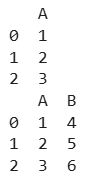
Explanation: This code first creates a Pandas DataFrame a with a single column 'A' containing values [1, 2, 3]. It then uses the assign() method to add a new column 'B' with values [4, 5, 6], resulting in a modified DataFrame b while keeping the original DataFrame unchanged.
DataFrame.assign(**kwargs)
Parameters:
Returns: A new DataFrame with additional or modified columns while keeping the original DataFrame unchanged.
For the link to the CSV file Used in the Code, click here
Let's explore some practical examples demonstrating how to use the assign() method.
Output
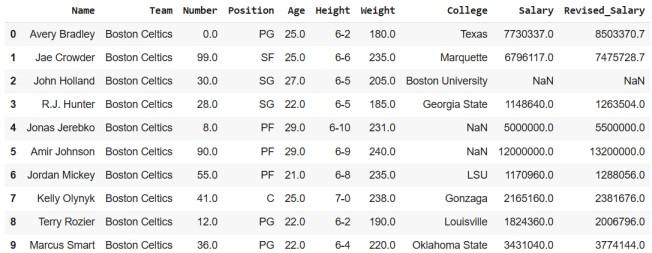
Explanation: This code displays the first 10 rows using head(10). After that, a new DataFrame (df_new) is created using the assign() method, where a new column "Revised_Salary" is added. This column is calculated by increasing each value in the "Salary" column by 10%. Finally, the first 10 rows of the updated DataFrame are displayed using head(10).
We can add multiple new columns simultaneously using the assign() method. In this example:
Output
Explanation: This code creates a new DataFrame (df_new) by adding two new columns using the assign() method. The "New_Team" column is generated by appending "_GO" to each value in the "Team" column. The "Revised_Salary" column is computed by increasing each value in the "Salary" column by 10%. Finally, the first 10 rows of the updated DataFrame are displayed using head(10).