|
VOOZH | about |
|
VOOZH | about |
CSV files are Comma-Separated values files that allow storage of tabular data.
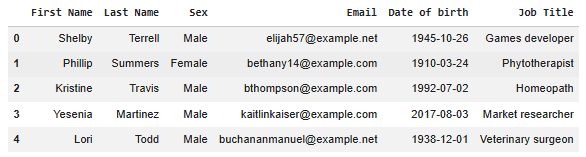
In the code below, we are working with a CSV file named people.csv which contains people data.
Output
read_csv() function in Pandas is used to read data from CSV files into a Pandas DataFrame. A DataFrame is a data structure that allows you to manipulate and analyze tabular data efficiently. CSV files are plain-text files where each row represents a record and columns are separated by commas (or other delimiters).
pd.read_csv(filepath_or_buffer, sep=' ,' , header='infer', index_col=None, usecols=None, engine=None, skiprows=None, nrows=None)
Parametersthere are no :
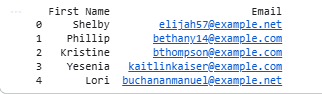
The usecols parameter allows to load only specific columns from a CSV file. This reduces memory usage and processing time by importing only the required data.
Output
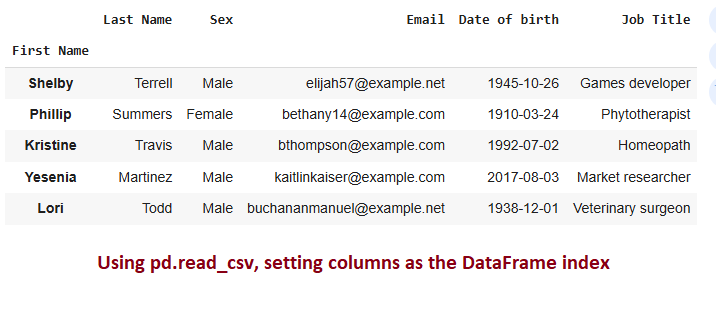
The index_col parameter sets one or more columns as the DataFrame index, making the specified column(s) act as row labels for easier data referencing.
Output
The na_values parameter replaces specified strings (e.g., "N/A", "Unknown") with NaN, enabling consistent handling of missing or incomplete data during analysis.\
na_values only specifies which values should be treated as NaN; it does not guarantee that the dataset has no missing values.
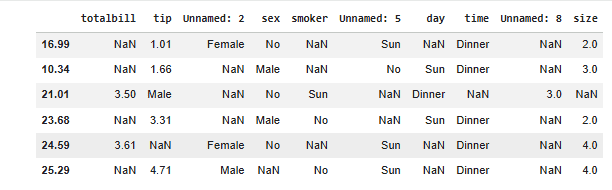
In this example, we will take a CSV file and then add some special characters to see how the sepparameter works.
totalbill_tip, sex:smoker, day_time, size
16.99, 1.01:Female|No, Sun, Dinner, 2
10.34, 1.66, Male, No|Sun:Dinner, 3
21.01:3.5_Male, No:Sun, Dinner, 3
23.68, 3.31, Male|No, Sun_Dinner, 2
24.59:3.61, Fe...
The sample data is stored in a multi-line string for demonstration purposes.
sep): The sep='[:, |_]' argument allows Pandas to handle multiple delimiters (:, |, _, ,) using a regular expression.Output
The nrows parameter limits the number of rows read from a file, enabling quick previews or partial data loading for large datasets. Here, we just display only 3 rows using nrows parameter.
Output
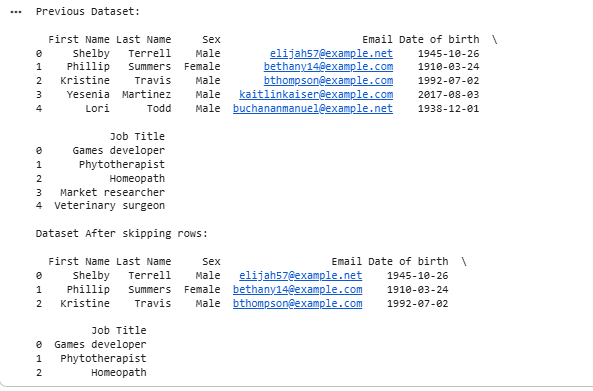
The skiprows parameter skips unnecessary rows at the start of a file, which is useful for ignoring metadata or extra headers that are not part of the dataset.
Output
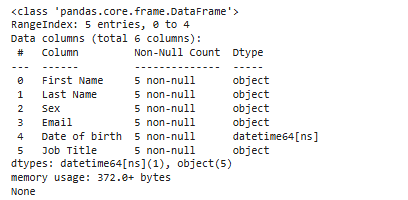
The parse_dates parameter converts date columns into datetime objects, simplifying operations like filtering, sorting or time-based analysis.
Output
Pandas allows you to directly read a CSV file hosted on the internet using the file's URL. This can be incredibly useful when working with datasets shared on websites, cloud storage or public repositories like GitHub.
Output