|
VOOZH | about |
|
VOOZH | about |
Combining multiple columns in Pandas groupby operation with a dictionary helps to aggregate and summarize the data in a custom manner. It is useful when you want to apply different aggregation functions to different columns of the same dataset.
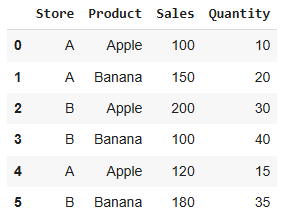
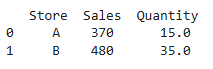
Let's take an example of a sales dataset, where we need to group the data by Store column and then apply different aggregation functions to Sales and Quantity:
Output:
You can also apply more complex or multiple aggregation functions to the same column. For example:
Output:
 Store Sales Quantity
 sum mean max min
0 A 370 123.333333 20 10
1 B 480 160.000000 40 30
The aggregation dictionary specifies multiple functions for both Sales and Quantity. The result includes the sum and mean for Sales, and the maximum and minimum for Quantity.
If you want to use a custom aggregation function, you can pass a function name or lambda function inside the dictionary:
Output:
 Store Sales Quantity
0 A 50 45
1 B 100 105
The custom function lambda x: x.max() - x.min() computes the range of Sales, while Quantity is summed.
Using a dictionary with groupby in Pandas makes it easy to perform multiple aggregations on different columns in one go. It enhances code readability, reduces complexity, and provides a flexible way to manipulate your data.