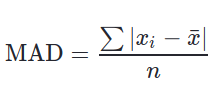
Pandas provide a method to make Calculation of MAD (Mean Absolute Deviation) very easy. MAD is defined as average distance between each value and mean.
The formula used to calculate MAD is:
👁 Image
Syntax: Series.mad(axis=None, skipna=None, level=None)
Parameters:
axis: 0 or ‘index’ for row wise operation and 1 or ‘columns’ for column wise operation.
skipna: Includes NaN values too if False, Result will also be NaN even if a single Null value is included.
level: Defines level name or number in case of multilevel series.
Return Type: Float value
Example #1:
In this example, a Series is created from a Python List using Pandas .Series() method. The .mad() method is called on series with all default parameters.
Output:
5.876543209876543
Explanation:
Calculating Mean of series mean = (5+12+1+0+4+22+15+3+9) / 9 = 7.8888
MAD = | (5-7.88)+(12-7.88)+(1-7.88)+(0-7.88)+(4-7.88)+(22-7.88)+(15-7.88)+(3-7.88)+(9-7.88)) | / 9.00
MAD = (2.88 + 4.12 + 6.88 + 7.88 + 3.88 + 14.12 + 7.12 + 4.88 + 1.12) / 9.00
MAD = 5.8755 (More accurately = 5.876543209876543)