|
VOOZH | about |
|
VOOZH | about |
In Python Pandas, we have the freedom to add different functions whenever needed like lambda function, sort function, etc. We can apply a lambda function to both the columns and rows of the Pandas data frame.
Syntax: lambda arguments: expression
An anonymous function which we can pass in instantly without defining a name or any thing like a full traditional function.
Below are some methods and ways by which we can apply lambda functions to Pandas:
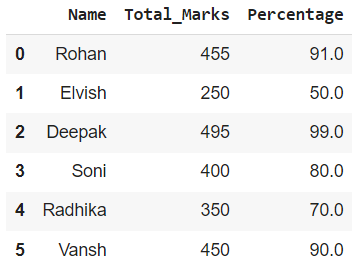
In this example, we will apply the lambda function Dataframe.assign() to a single column. The function is applied to the 'Total_Marks' column, and a new column 'Percentage' is formed with its help.
Output:
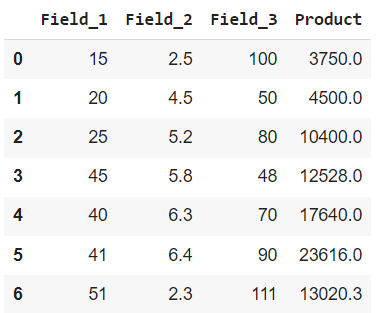
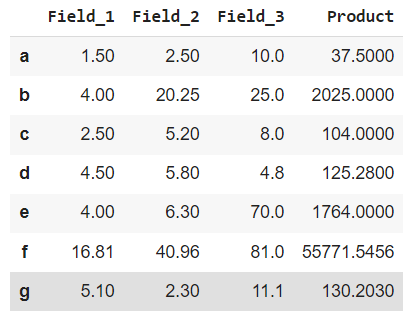
In this example, we will apply the lambda function Dataframe.assign() to multiple columns. The lambda function is applied to 3 columns i.e., 'Field_1', 'Field_2', and 'Field_3'.
Output:
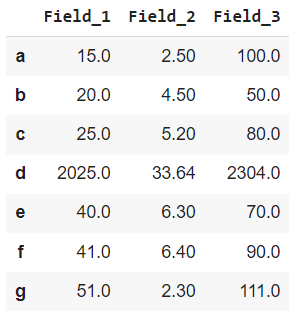
In this example, we will apply the lambda function Dataframe.apply() to single row. The lambda function is applied to a row starting with 'd' and hence square all values corresponding to it.
Output:
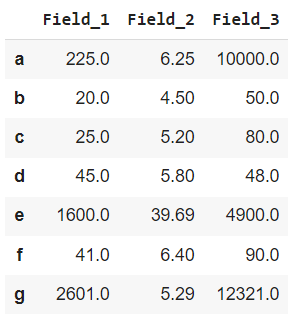
In this example, we will apply the lambda function to multiple rows using Dataframe.apply(). The lambda function is applied to 3 rows starting with 'a', 'e', and 'g'.
Output:
In this example, we will apply the lambda function simultaneously to multiple columns and rows using dataframe.assign() and dataframe.apply().
Output