|
VOOZH | about |
|
VOOZH | about |
In Selenium WebDriver, an exception is an event that disrupts the normal flow of test execution. Exceptions typically occur when WebDriver encounters problems while interacting with elements, managing browser sessions, or executing JavaScript. These errors could be due to various reasons, such as elements not being found, issues with browser compatibility, or network failures.
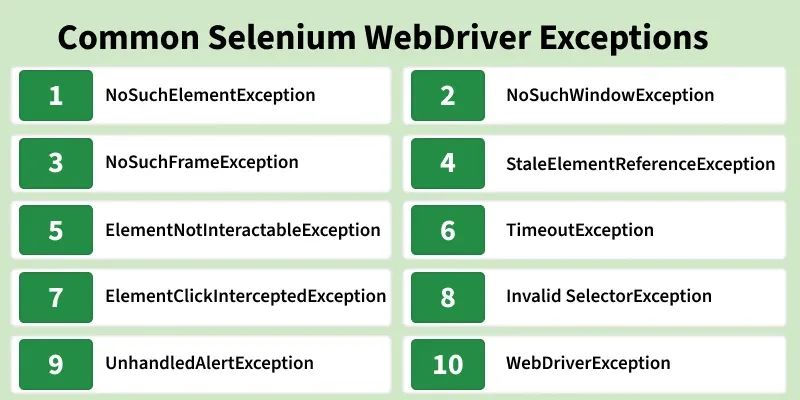
Here’s a breakdown of some of the most common exceptions you will encounter in Selenium WebDriver, their causes, and ways to handle them.
Cause: Occurs when Selenium cannot locate an element using the provided locator strategy. This is one of the most frequent exceptions in Selenium.
Example:
driver.findElement(By.id("invalidID")); // Element not found in DOMSolution:
Cause: Raised when trying to switch to a window that does not exist. This can happen when working with multiple browser windows or tabs.
Example:
driver.switchTo().window("invalidWindowHandle");Solution:
driver.getWindowHandles() to get all active window handles.Cause: Occurs when attempting to switch to a frame that is not present in the DOM.
driver.switchTo().frame("invalidFrameName");Cause: This exception is raised when an element reference becomes invalid because the DOM has been updated (e.g., after a page refresh or dynamic updates).
Example:
WebElement element = driver.findElement(By.id("button"));
driver.navigate().refresh();
element.click(); // Reference is stale after page refresh
Solution:
WebElement element = driver.findElement(By.id("button"));
driver.navigate().refresh();
element = driver.findElement(By.id("button"));
element.click();
Cause: Occurs when an element is present in the DOM but not interactable (e.g., it is hidden, disabled, or covered by another element).
Example:
driver.findElement(By.cssSelector("hiddenElement")).click();Solution:
ExpectedConditions to ensure the element is clickable.Cause: Triggered when an operation (like an explicit wait) exceeds the specified timeout.
WebDriverWait wait = new WebDriverWait(driver, Duration.ofSeconds(5));
wait.until(ExpectedConditions.visibilityOfElementLocated(By.id("delayedElement")));
Solution:
Cause: Raised when an element is obscured by another element, such as an overlay or modal, preventing interaction.
Example:
driver.findElement(By.id("button")).click(); // Obstructed by overlaySolution:
Use JavaScript Executor: To click on elements that are blocked or covered by other UI elements:
JavascriptExecutor js = (JavascriptExecutor) driver;
js.executeScript("arguments[0].click();", driver.findElement(By.id("button")));
Cause: Occurs when an invalid selector is used, such as incorrect XPath or CSS syntax.
Example:
driver.findElement(By.xpath("input[id='myInput']")); // Invalid XPath syntaxSolution:
Cause: Raised when an alert is present but not handled during test execution.
Example:
driver.switchTo().alert().accept(); // No alert presentSolution:
Check for alert presence: Always verify if an alert is present before attempting to interact with it:
if (ExpectedConditions.alertIsPresent().apply(driver) != null) { driver.switchTo().alert().accept();}Cause: A generic exception for WebDriver-related errors, such as session issues or unknown commands.
Solution:
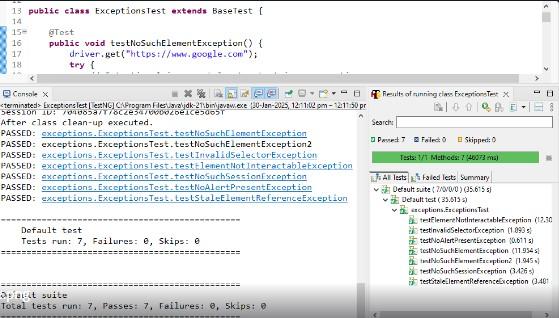
Output:
Try-catch blocks are the most common way to handle exceptions in Selenium. By catching specific exceptions, we can handle errors without abruptly terminating the test.
Example:
try {
 driver.findElement(By.id("invalidID")).click();
} catch (NoSuchElementException e) {
 System.out.println("Element not found: " + e.getMessage());
}
Explicit Waits ensure that we wait for certain conditions to be met before interacting with elements. This helps prevent errors like NoSuchElementException or TimeoutException.
Example:
WebDriverWait wait = new WebDriverWait(driver, Duration.ofSeconds(10));
WebElement award = wait.until(ExpectedConditions.presenceOfElementLocated(By.id("award")));
If a page is refreshed or updated, any previously located elements may become stale. Reinitializing the element reference before interacting with it ensures the test continues smoothly.
Example:
try {
 element.click();
} catch (StaleElementReferenceException e) {
 element = driver.findElement(By.id("elementID"));
 element.click();
}
Before switching to an alert, we should check if one is present. This prevents exceptions like UnhandledAlertException.
Example:
if (ExpectedConditions.alertIsPresent().apply(driver) != null)
{
 driver.switchTo().alert().accept();
}