|
VOOZH | about |
|
VOOZH | about |
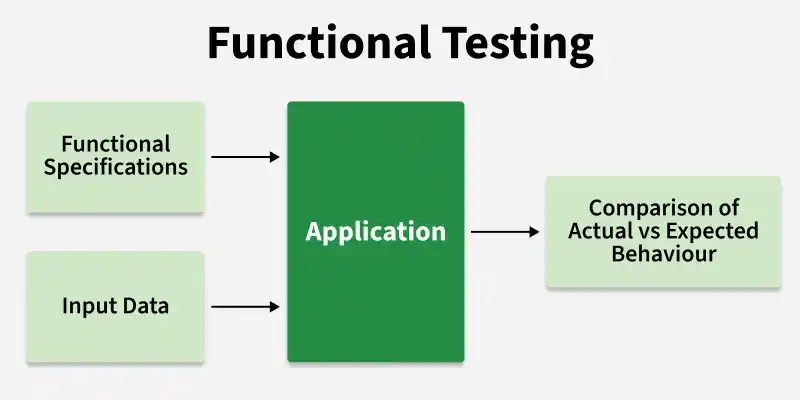
Functional Testing is a type of software testing that verifies whether the application works according to the specified requirements. It focuses on testing features, functions, and user interactions to ensure correct output for given inputs. This testing is performed without considering the internal code structure.
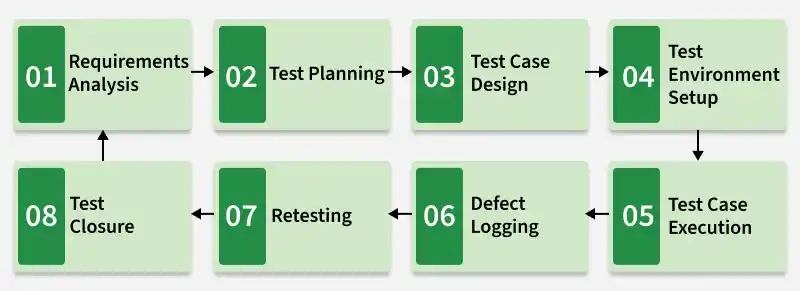
The functional testing process is a continuous cycle where each step is connected, ensuring the software meets all requirements and quality standards.
Involves understanding and analyzing business and functional requirements to identify testable scenarios and clarify ambiguities.
Output: Requirement Understanding Document
Involves defining the testing strategy, scope, resources, and timeline to ensure effective execution of testing activities.
Output: Test Plan
Involves creating detailed test cases and preparing data to validate application functionality.
Output: Test Cases + Test Data
Involves setting up the required hardware and software environment for executing test cases.
Output: Ready Test Environment
Involves executing test cases and comparing expected results with actual results.
Output: Test Execution Report
Involves identifying, documenting, and tracking defects found during testing.
Output: Defect Report
Involves verifying that previously reported defects have been fixed correctly.
Output: Verified Fixes
Involves completing all testing activities and preparing final reports for stakeholders.
Output: Test Closure Report
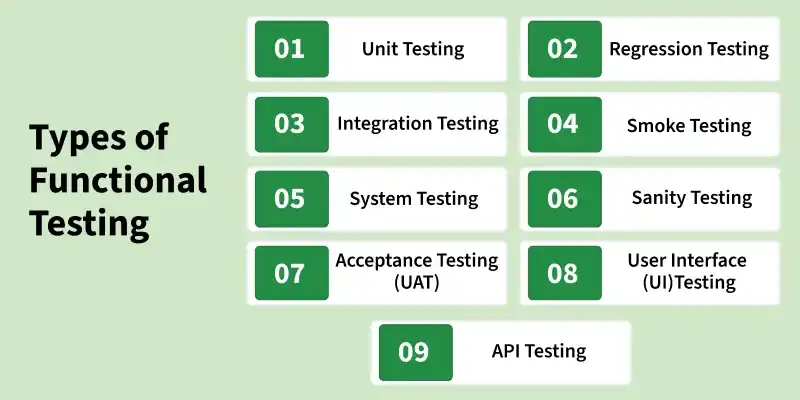
There are various types of functional Testing which are as follows:
Unit testing tests individual functions or modules in isolation to verify correct behavior. Mainly performed by developers during coding.
Integration Testing validates interaction between integrated modules to ensure smooth data flow and communication.
System Testing evaluates the complete system against specified requirements in a production-like environment.
Acceptance Testing confirms the system meets business needs and is ready for delivery. Conducted by clients or end users.
Regression Testing ensures that recent changes or bug fixes do not impact existing functionality.
Smoke Testing performs a quick check on major functionalities to verify build stability before detailed testing.
Sanity Testing focuses on validating specific functionality after minor updates or bug fixes.
User Interface (UI) Testing verifies that the application’s UI is user-friendly, responsive, and functions correctly.
API Testing tests backend services to ensure correct request-response behavior and data handling.
Functional testing techniques are methods used to design test cases and validate that the software works according to requirements.
Involves dividing input data into groups (valid and invalid) so that testing can be done using one value from each group.
Example: Age field (18–60) -> test 17, 30, 61
Involves testing values at the boundaries of input ranges where defects are most likely to occur.
Example: Range 1–100 -> test 0, 1, 2, 99, 100, 101
Involves testing different combinations of conditions and their corresponding actions using a table format.
Example: Login with valid/invalid username & password combinations
Involves testing system behavior based on different states and transitions between those states.
Example: Login attempts -> success, failure, account lock after multiple attempts
Involves validating complete end-to-end user scenarios to ensure system functionality.
Example: Online shopping -> search -> add to cart -> checkout -> payment
Involves identifying possible defects based on tester’s experience and intuition.
Example: Testing blank fields, special characters, invalid inputs
Involves identifying relationships between input conditions (causes) and outputs (effects) to design test cases.
Example: Login system with conditions:
Cause 1: Valid Username
Cause 2: Valid Password
Effect: Login Successful
Test Cases:
Involves testing combinations of input parameters in pairs to reduce the total number of test cases.
Example: Website testing with inputs:
- Browser: Chrome, Firefox
- OS: Windows, Mac
- Network: WiFi, Mobile Data
Instead of testing all combinations (2×2×2 = 8), pairwise reduces cases like:
Note: Each pair combination is covered at least once
Tools used for functional testing are as follows:
Functional testing ensures that an application’s features work as intended according to the specified requirements. It primarily focuses on the following areas:
Incomplete or Changing Requirements : Frequent requirement changes break test cases and increase rework.
Solution: Adopt agile test practices, involve QA in sprint planning, and use requirement versioning.
Test Data Management : Creating realistic test data for all scenarios is time-consuming.
Solution: Use data generation tools and maintain a centralized test data repository.
Environment Instability : Flaky environments cause false test failures.
Solution: Use containerization (Docker) to ensure consistent, reproducible environments.
Insufficient Test Coverage : Critical scenarios are missed due to time pressure.
Solution: Use risk-based testing to prioritize high-impact areas and track coverage metrics.
Automation Maintenance Overhead : Automated scripts break with UI changes.
Solution: Use page object model (POM) patterns and decouple test logic from implementation details.