How to make Firefox headless programmatically in Selenium with Python?
Last Updated : 23 Jul, 2025
Selenium is a powerful tool for web automation and testing. You can use Firefox in headless mode when you need to automate web interactions without a visible browser window. Running Firefox headless allows you to perform tasks like automated testing, web scraping, and server-side rendering more efficiently.
This guide will show you how to configure and use headless Firefox with Selenium in Python, making your automation scripts faster and more resource-efficient.
This article will focus on running Firefox in headless mode using Selenium with Python, explaining what headless Firefox is and how to use it programmatically.
What Is Headless Firefox?
Headless Firefox refers to a version of the Mozilla Firefox web browser that operates without a graphical user interface (GUI). This means that when Firefox is run in headless mode, it does not display the web pages on the screen. Instead, it performs all the usual web browsing tasks in the background.
What Is a Browser in Headless Mode?
A browser in headless mode is a web browser that runs without showing any visual interface. Essentially, it’s like running a browser in "invisible" mode. This mode is useful for several tasks:
Automated Testing: You can run automated tests on web applications without needing to open a browser window. This speeds up the testing process and is particularly useful for Continuous Integration (CI) environments.
Web Scraping: Headless browsers can extract data from websites without rendering the page, making data collection more efficient.
Server-Side Rendering: Web applications that need to render pages on the server side can use headless browsers to generate HTML content without needing a visible browser.
Can Firefox Run Headless?
Yes, Mozilla Firefox can indeed run in headless mode. This feature allows Firefox to be used for automated tasks and testing without a graphical interface. It’s particularly useful for developers and testers who need to run scripts or tests on web applications without the overhead of a visible browser window.
How can Firefox Run Headless?
To run Firefox in headless mode, you need to configure it with specific options when creating a WebDriver instance using Selenium. Here’s a simplified explanation of how to do this:
Install Selenium and WebDriver: Make sure you have Selenium and the Firefox WebDriver (GeckoDriver) installed.
Set Up Firefox to Run Headless: When creating a Firefox WebDriver instance, you need to specify that Firefox should run in headless mode. This is done by setting the headless option in the Firefox options.
How to Start Firefox Headless?
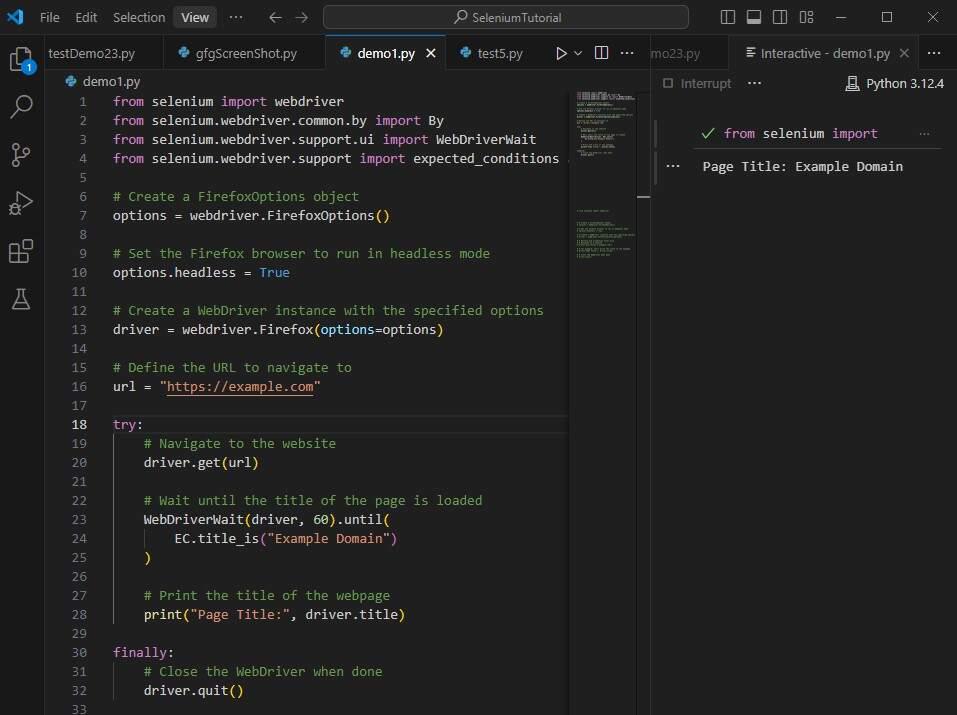
To start Firefox in headless mode using Selenium with Python, follow these steps:
Step 1. Import Necessary Libraries:
Step 2. Configure Firefox for Headless Mode:
Step 3. Create a WebDriver Instance with Headless Options:
Step 4. Use the WebDriver to Interact with Web Pages:
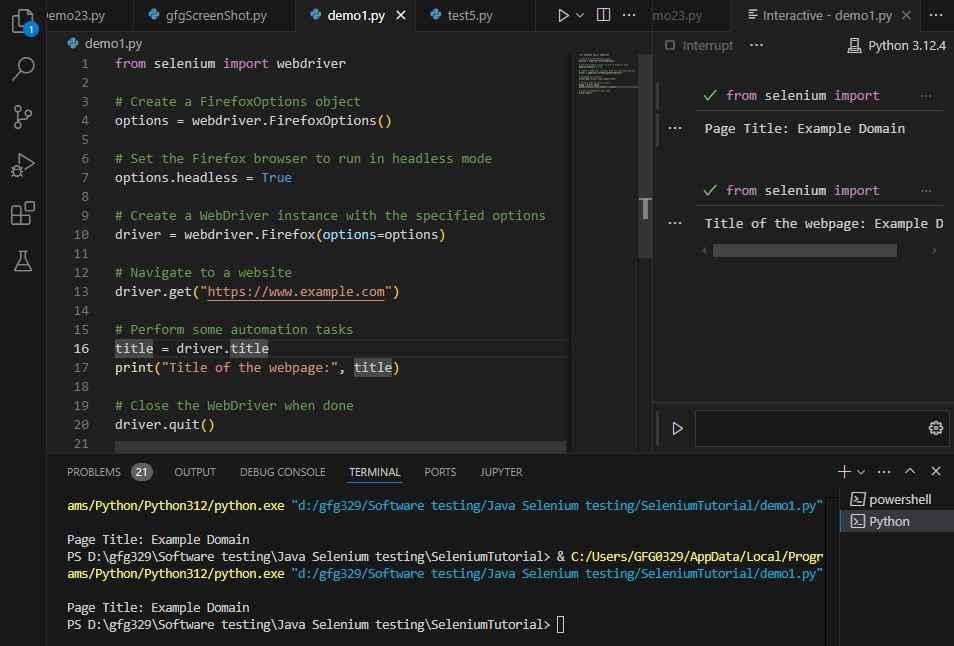
Step 5. Running Firefox in Headless Mode with Selenium.
This demonstrates how to use Firefox in headless mode with Selenium in Python to automate web browsing tasks.
Advantages of Firefox Headless Browser
Efficiency: Running Firefox in headless mode consumes fewer system resources because it doesn't render the GUI, leading to faster execution of tasks.
Speed: Headless browsers can perform tasks quicker than standard browsers, which is beneficial for automated testing and web scraping.
Continuous Integration (CI) Compatibility: Headless mode is ideal for CI environments where tests need to be executed automatically without manual intervention.
Script Automation: Headless Firefox can automate browser actions such as navigating pages, filling out forms, and clicking buttons, making it useful for various automation tasks.
Scalability: Running multiple headless browsers concurrently is easier and more scalable compared to using browsers with GUIs, allowing for parallel testing and tasks.
Server-Side Rendering: Headless browsers can be used for server-side rendering of web pages, generating HTML content without the need for a visible browser.
Limitations of Firefox Headless Browser
Debugging Challenges: Without a visual interface, it can be more challenging to debug issues and visually verify what is happening during the automated tasks.
Limited Interaction: Certain web elements or interactions that rely on visual cues might not behave the same way in headless mode as they do in a regular browser.
Browser-Specific Bugs: Headless mode may expose browser-specific bugs or differences in behavior compared to running with a GUI, potentially affecting test accuracy.
Media and Graphics: Handling media playback, complex animations, and other graphical elements can be more difficult or unsupported in headless mode.
Environment Setup: Setting up and configuring headless browsers might require additional steps and knowledge compared to using standard browsers.
Lack of Extensions: Some browser extensions and plugins may not function or be available in headless mode, limiting certain capabilities.