VOOZH about

URL: https://www.geeksforgeeks.org/software-testing/junit-writing-sample-test-cases-for-studentservice-in-java/

⇱ JUnit - Writing Sample Test Cases for StudentService in Java - GeeksforGeeks


  • Courses
  • Tutorials
  • Interview Prep

JUnit - Writing Sample Test Cases for StudentService in Java

Last Updated : 5 May, 2026

JUnit is a popular testing framework used to validate Java applications. It helps ensure that business logic works correctly by writing and executing test cases.

  • Used for unit testing Java applications
  • Validates business logic automatically
  • Helps improve code quality and reliability

Project Overview

In this project, we manage student data using a service class and validate operations using JUnit. The system performs operations like add, insert, remove, and filter students.

  • Uses ArrayList to store student data
  • Includes operations like filtering by course and GPA
  • All operations are validated using JUnit

Project Structure

This is a Maven-based project where dependencies and build configuration are managed in pom.xml.

  • model -> Student class
  • service -> Business logic
  • test -> JUnit test cases

Step-by-Step Project Creation

Step 1: Create Maven Project

Create a new Maven project in IntelliJ/Eclipse.

  • Select Maven archetype
  • Set GroupId and ArtifactId
  • Use Java version (8 or above)

Step 2: Add Dependencies (pom.xml)

Add JUnit dependency for testing.

pom.xml

Step 3: Create Student Model Class

Create a Student class with attributes like ID, name, course, and GPA.

Student.java

Step 4: Create Service Class

This is basically a business logic file. Following student service operations are taken care of this.

  • Appending students to a list and returning student list size
  • Inserting students in the middle of the list and returning student list size
  • Removing the students from the list and returning the student list size
  • Retrieving student name by means of index position
  • Retrieving coursewise student list
  • Retrieving gpawise student list

Step 5: Create Test Class

Always need to check for the quality of software by means of doing JUNIT testing

TestStudentServicesJava.java

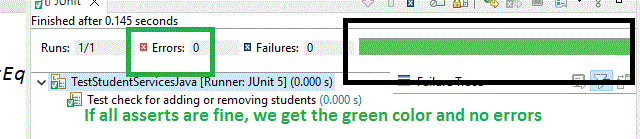
We need to create sample test data and at each and every point in time, the business logic file outcome should be validated and it should satisfy the asserts. In this way, we can conclude that the written part of the code is fine and satisfies different scenarios. Let us run the JUNIT file

👁 Image
 

Output of Testcases:

👁 Image

With this, we can check them and in case of any errors, we can modify the business logic and rectify the same to achieve in green color.

Comment
Article Tags:

Explore