|
VOOZH | about |
|
VOOZH | about |
In many software, we will be working with HashMap and HashSet and always there is confusion exists that when to use HashMap and when to use HashSet. As a sample project, a use case containing the "GeekAuthor" class is taken and it has different attributes namely
Let us try to add the "GeekAuthor" data both in HashMap and HashSet separately and check the behaviors one by one. Along with JUNIT, we can test effectively also.
Project Structure:
Project is prepared as of type maven and hence all the dependencies required for the project are present in
pom.xml
As we are going to add GeekAuthors, we need the model class for it
GeekAuthor.java
Here we need to pay attention to two specific methods namely "equals" and "hashCode". They should be overridden according to our requirements. These two methods are essentially required to check whether the objects are duplicates or not. They are again given here for reference.
// We need to override 2 methods namely equals
// and hashcode whenever we no need
// to store two author objects
// if their names are same
@Override
public boolean equals(Object o) {
 if (o instanceof GeekAuthor) {
 GeekAuthor other = (GeekAuthor) o;
 return authorName.equals(other.getAuthorName());
 }
 return false;
 }

 @Override
 public int hashCode() {
 return authorName.hashCode();
 }
This set of code is highly essential and with that only HashSet functionality disallows duplicates. Here we need to know that HashMap allows duplicate keys but what will happen is that newly added data is overwritten in place of old data. For example
authorMap.put("Rachel",new GeekAuthor("Rachel", 1, "Java", 200));
authorMap.put("Monica",new GeekAuthor("Monica", 1, "Python", 100));
authorMap.put("Rachel",new GeekAuthor("Phoebe", 1, "Java", 100));
In line 1 and 3, "Rachel" is the key. Hence finally in the HashMap we can able to see only 2 entries only
and when we try to retrieve the data for "Rachel" key, we will get
authorName as Phoebe, authorId as 1 etc.,
i.e. 1st data is overwritten
Now coming to HashSet, if we try to add duplicate data, they will not be considered at all because of the existing 2 methods namely "equals" and "hashCode"
GeekAuthor rachel = new GeekAuthor("Rachel", 1, "Java", 200);
GeekAuthor monica = new GeekAuthor("Monica", 1, "Python", 100);
GeekAuthor phoebe = new GeekAuthor("Rachel", 1, "Java", 200);
authorSet.add(rachel);
authorSet.add(monica);
authorSet.add(phoebe);
Here though "phoebe" named author object is created and since it is a duplicate value ("rachel" named author
objectis already added with the same data, finally only 2 author data is there.
Let us see the full set of codes via
HashMapCollectionServicesInJava.java
HashSetCollectionServicesInJava.java
Ok, now let's test it out. We need to test whether our assumptions are correct or not. i.e. during hashmap addition what is happening and with HashSet addition what is happening, we can justify with the below testcases.
TestCollectionServicesJava.java
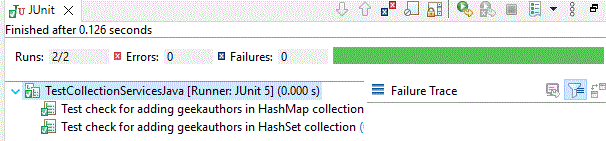
Output of the JUNIT testcase:
Two lines of code, we need to carefully observe. In HashMap, it allows duplicates and when there are duplicates, the new value is replaced in the place of the old value. Hence below assert has come correct
// "Rachel" key is duplicated, now lets assert that the last taken value is updated for "Rachel" key
assertEquals(true, hashMapCollectionServicesJavaObject.getAuthorName(authors,"Rachel").equalsIgnoreCase("Phoebe"));
At the same time, in the case of HashSet, it will not allow duplicates; because of the "equals" and "hashCode" methods, the duplicates cannot be added.
GeekAuthor rachel = new GeekAuthor("Rachel", 1, "Java", 200);
// "Rachel" author is duplicated and since we have overridden equals and hashcode method,
// duplicates are not allowed and hence we get only "Rachel" as the output
assertEquals(true, collectionObject.getAuthorName(authors,rachel).equalsIgnoreCase("Rachel"));