Page Object Model and Page Factory in Selenium Using Java
Last Updated : 18 May, 2026
Page Object Model (POM) and Page Factory are design patterns used to improve the structure and maintainability of test automation code. They help organize web elements and actions while keeping test scripts clean and reusable.
Separates test logic from UI elements for better maintainability.
Promotes reusability by organizing elements into page classes.
Improves readability and structure of test automation code.
Implementing Page Object Model (POM) in Selenium
POM implementation involves creating separate classes for each page and using them in test scripts to achieve better structure and reusability.
Create separate classes for each web page.
Define web elements and actions inside page classes.
Use these classes in test scripts for execution.
Step 1: Set Up Eclipse Project
Create a Maven project and add required dependencies for Selenium and TestNG.
Add Selenium WebDriver dependency for browser automation.
Add TestNG dependency for test execution.
Ensure the project builds successfully.
Step 2: Create Package for Page Objects
Create a package to store all page classes.
Go to src/main/java.
Create a package named pages.
This package will contain all page object classes.
Step 3: Create a Page Class
Create a class representing the login page and define its elements and actions.
Define locators for web elements.
Create methods for actions like login.
Use a constructor to initialize WebDriver.
Step 4: Create Package for Test Classes
Create a separate package for test scripts.
Go to src/test/java.
Create a package named tests.
Keeps test logic separate from page objects.
Step 5: Create a Test Class
Create a test class to execute test cases using the page class.
Page Factory is an extension of the Page Object Model (POM) that simplifies the initialization of web elements using built-in Selenium support. It reduces boilerplate code and improves the readability and maintainability of test automation scripts.
Automatic Element Initialization: Uses annotations like @FindBy to initialize elements, reducing the need for repeated findElement calls.
Cleaner and Readable Code: Separates element locators from test logic, making code more organized and easy to understand.
Better Organization: Keeps all web elements structured within page classes for easier management.
Improved Maintainability: Changes in locators are handled in one place without affecting test scripts.
Efficient Execution: Supports lazy initialization of elements, improving performance by loading elements only when required.
Implementing Page Factory in Selenium
Page Factory simplifies the implementation of Page Object Model (POM) by using annotations to initialize web elements. It reduces code complexity and improves readability.
Uses @FindBy annotations to define web elements.
Automatically initializes elements using PageFactory.initElements().
Reduces repetitive findElement calls and improves code structure.
Step 1: Create Page Factory Class
Create a class (LoginPageFactory) inside the pages package to define elements and actions.
Use @FindBy to locate elements.
Initialize elements using PageFactory.
Define methods for actions like login.
Step 2: Create Test Class
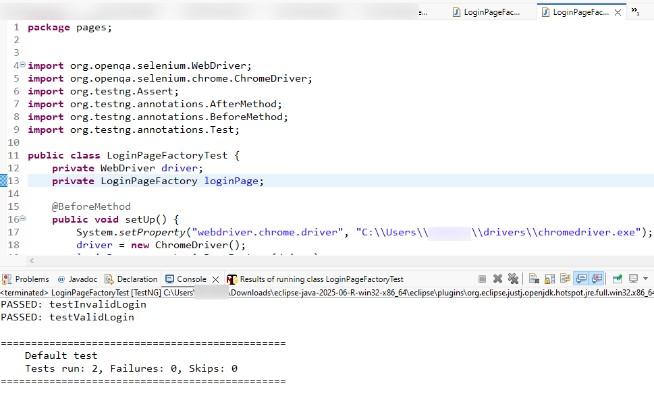
Create a test class (LoginPageFactoryTest) to execute test cases using the Page Factory class.
Initialize WebDriver.
Use Page Factory class methods.
Write test cases for valid and invalid login.
Step 3: Execute Tests
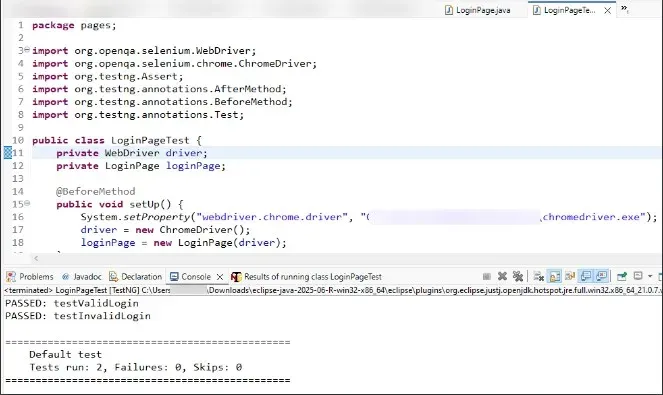
Run the test class and verify the results.
Right-click > Run As > TestNG Test.
Check execution in Eclipse console. -
Validate results in TestNG reports.
Run As > TestNG Test and verify results in the Eclipse console or TestNG reports.
Output: The image below shows the successful execution of Page Factory test cases in Selenium.
In the current POM and Page Factory implementation, WebDriver setup, browser initialization, and teardown are repeated in every test class.
This results in code duplication and makes the framework harder to maintain.
To follow best practices, a Base Class approach is used to centralize common setup and cleanup operations.
1. BaseTest Class Implementation
This BaseTest class handles common browser setup and teardown operations to avoid repetition across test classes.
2. Usage in POM Test Class
This test class reuses the BaseTest setup, keeping only the test logic and improving readability.
3. Usage in Page Factory Test Class
This class also inherits the common setup, ensuring consistency and reducing code duplication.
Advantages of the Page Object Model
The Page Object Model enhances test automation by improving code organization, reusability, and maintainability through clear separation of test logic and UI elements.
Code Reusability: Encapsulates web elements and actions in page classes for reuse across test cases, minimizing duplication.
Code Maintainability: Changes to UI elements are confined to their respective page classes, simplifying updates and reducing errors.
Separation of Concerns: Keep test scripts focused on logic while page classes manage UI interactions, enhancing clarity.
Readability: Use descriptive method names in page classes to make test scripts intuitive for testers and developers.
Enhanced Test Structure: Organize scripts by page to mirror the application’s structure, improving navigation.
Improved Collaboration: Clear separation fosters better communication between testers and developers.
Limitations of Page Object Model (POM) and Page Factory
Although POM and Page Factory improve test structure and maintainability, they also come with certain limitations that should be considered before implementation.
High Initial Effort: Designing page classes and maintaining object structure requires extra time during framework setup.
Maintenance Overhead in Large Projects: As the application grows, the number of page classes increases, making maintenance complex.
Not Suitable for Very Dynamic UI: Frequent UI changes may require updates in multiple page classes.
Learning Curve: Beginners may find it difficult to understand framework design and structure.
Page Object Model Vs Page Factory in Selenium
Here are the differences between Page Object Model and Page Factory in Selenium.
Aspect
Page Object Model (POM)
Page Factory
Initialization
Uses traditional methods to initialize web elements.
Utilizes PageFactory.initElements for initializing web elements.
Element Locators
Web elements are typically located using methods like findElement.
Web elements are defined using @FindBy annotations.
Code Readability
Can be less concise due to manual element initialization.
More concise and cleaner due to annotation-based element definitions.
Performance
Web elements are loaded when the page class is instantiated.
Lazy initialization; elements are loaded only when they are used.
Ease of Maintenance
Requires manual updates to element locators and initialization.
Easier to maintain with annotations and centralized initialization.
Syntax
Standard Java syntax for defining and interacting with web elements.
Uses annotations (@FindBy) to define element locators.
Error Handling
Errors in element locating are more immediately visible.
May defer errors until elements are actually interacted with.
Test Script Structure
Typically requires more boilerplate code for element definitions.
Reduces boilerplate with annotation-based element initialization.
Use Case
Suitable for projects where explicit control over element initialization is needed.
Ideal for projects requiring cleaner and more concise code with annotation support.