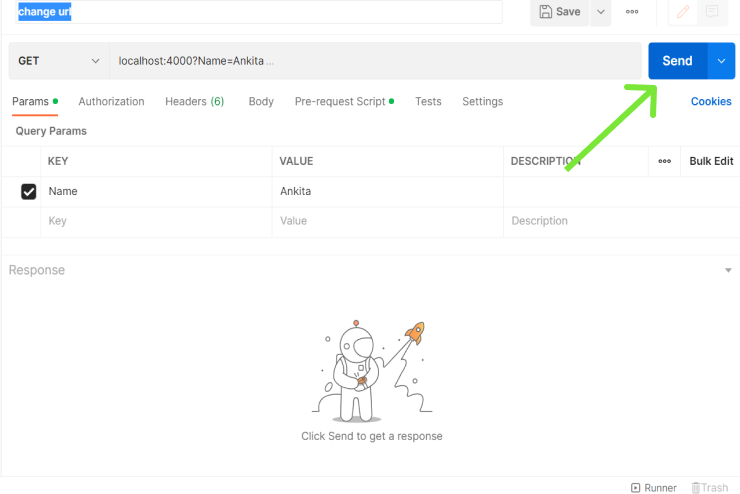
REST API Testing validates the correctness, performance, and reliability of APIs that follow REST principles. Unlike GUI testing, REST API testing focuses on request-response validation at the message layer using tools like Postman or cURL.
Objectives
Ensure API endpoints return expected responses.
Verify HTTP status codes, headers, and payloads.
Validate integration between client and server.
Ensure security and error handling mechanisms work as intended.
Different Ways of Testing REST APIs
There are several approaches to test RESTful APIs depending on the requirement and the test environment.
1. Manual Testing: Performed using tools like Postman or Insomnia to send requests manually and verify the response data. 2. Automated Testing: Uses frameworks and libraries to automate API test cases:
RestAssured (Java)
HTTPClient (Java)
SuperTest (JavaScript)
Pytest + Requests (Python)
3. Unit Testing: Developers write unit tests for each API method to check isolated behavior using mock services. 4. Integration Testing: Validates API interactions with other services or databases to ensure end-to-end workflow correctness. 5. Performance Testing: Checks API speed, stability, and scalability under load using tools like JMeter or K6.
Steps for Testing REST API
The general process of REST API testing involves preparing the environment, sending requests, and validating responses.
Step 1: Set Up Testing Environment
Create a suitable environment for testing APIs. Configure the required servers and databases based on the project requirements.
Step 2: Choose Testing Tool
Select tools like Postman, REST-assured, or Swagger. These can be used either online (browser-based) or installed locally.
Step 3: Enter API Endpoint
Provide the API URL in the request textbox of your chosen tool.
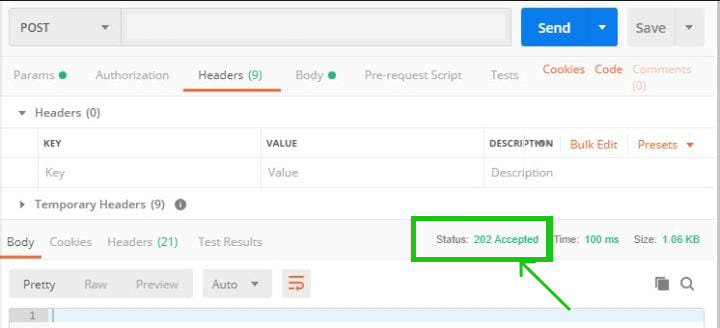
To ensure the response is correct, analyze key elements like status codes and response formats.
Status Code Range
Category
Description
1xx
Informational
Request received and under process.
2xx
Success
Request successfully completed.
3xx
Redirection
Further action required to complete the request.
4xx
Client Error
Invalid request or unauthorized access.
5xx
Server Error
Failure on the server side.
Common HTTP Status Codes
Code
Meaning
200
OK
201
Created
204
No Content
400
Bad Request
401
Unauthorized
403
Forbidden
404
Not Found
405
Method Not Allowed
500
Internal Server Error
502
Bad Gateway
503
Service Unavailable
A successful API test verifies:
Correct status code and content type.
Expected response structure.
Proper error handling for invalid inputs.
Top Tools for REST API Testing
1. Postman
A popular GUI-based tool for manual and automated API testing. Features:
Easy setup of parameters and headers.
Supports automation through scripting and collections.
Enables saving and reusing API requests.
Rich interface for debugging and validation.
2. REST-assured
A Java-based library designed for automation testing of REST APIs. Features:
Supports multiple HTTP methods like GET, POST, PUT, DELETE, PATCH.
Allows testing without deep knowledge of HTTP internals.
Follows BDD (Given/When/Then) syntax for readability.
Integrates easily with JUnit or TestNG.
3. Swagger
An open-source suite for designing, documenting, and testing REST APIs based on the OpenAPI Specification. Major Components:
Swagger Editor
Swagger UI
Swagger Codegen
Swagger Core
Features:
Enables interactive API documentation.
Supports design-to-deployment API lifecycle.
Centralized API management and collaboration.
Provides secure API design and version control.
4. Karate DSL
An open-source framework for API automation built on top of Cucumber and Java. Features:
Supports JSON and XML validation.
Allows multi-threaded parallel test execution.
Simplifies writing tests with its Domain Specific Language (DSL).
Provides built-in assertions and schema validation.
Enables configuration switching and payload reusability.
5. Katalon Studio
A comprehensive automation tool for API, Web, Mobile, and Desktop testing. Features:
Supports both REST and SOAP APIs.
Allows importing APIs from Postman, Swagger, or WSDL.
Offers manual and scripting test modes.
Includes data-driven testing and built-in reporting.
Integrates with CI/CD tools for deployment automation.
Challenges in REST API Testing
Initial Setup: Configuring test environments, databases, and servers requires technical knowledge and can take time before testing begins.
Maintaining Data Formatting ;Keeping the API schema updated ensures that new or modified parameters remain compatible with existing code.
Sequencing API Calls: APIs must be called in the correct order; for example, making a GET request before POST may cause errors if the data does not yet exist.
Parameter Validation: Validating all input parameters is challenging when multiple data types, ranges, and formats must be verified.
Testing Parameter Combinations: Complex APIs may have numerous parameter combinations, making it difficult to test every possible case efficiently.
Response Time Assertions: Slow API responses, especially those exceeding 10 seconds, can negatively impact application performance and user experience.


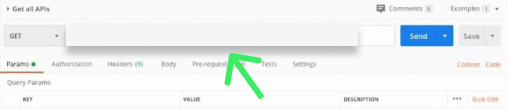


![👁 Write in params(key , value , [Description] is optional) the variables.](https://media.geeksforgeeks.org/wp-content/uploads/20221031225602/Untitled14.png)