A Maven-based automation testing framework using TestNG in IntelliJ IDEA enables structured, scalable, and efficient test development and execution.
Relies on Apache Maven for consistent dependency management and project organization
Uses TestNG to support annotations, test grouping, and parallel execution
Encourages clean project structure by following Maven’s standard directory layout
Improves test maintainability and scalability for large automation suites
Supports easy integration with CI/CD tools for continuous testing workflows
Challenges with Traditional Testing
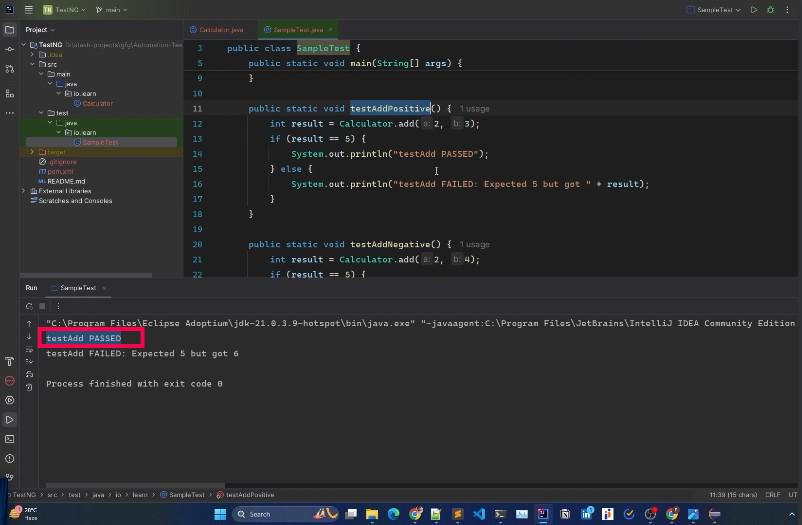
In a traditional Java testing setup, developers often relied on the main method for executing test cases. While functional for basic testing, this approach posed several challenges:
Manual Dependency Management: Dependencies between test cases had to be handled manually, leading to increased complexity.
No Built-in Reporting: The results were limited to console output, making it difficult to analyze and share reports.
No Test Grouping or Prioritization: There was no straightforward way to group or prioritize test cases.
Lack of Advanced Features: Features like data-driven testing or parallel execution were not natively supported.
Example: Testing a Calculator's Add Method Without TestNG
How TestNG Solves These Challenges
With TestNG, the testing process is streamlined, and the limitations of traditional methods are addressed effectively.
Example: Testing a Calculator's Add Method With TestNG
Simplified Test Structure: Test cases are defined with the @Test annotation, eliminating the need for a main method. TestNG internally manages the test execution.
Built-in Assertions: Assertions like Assert.assertEquals() provide a direct way to validate test results, replacing manual if-else checks.
Detailed Reporting: TestNG generates comprehensive HTML reports, showcasing the status of test cases along with execution times and error messages.
Annotations for Control: Annotations such as @BeforeSuite, @AfterSuite, @BeforeTest, and @AfterTest allow fine-grained control over the testing lifecycle.
Scalability: TestNG handles large test suites effortlessly with XML-based configurations and supports integration with tools like Maven for build management.
Advanced Features of TestNG
1. Parallel Execution
TestNG can execute multiple test cases simultaneously, saving time when testing large applications. For example:
2. Data-Driven Testing with @DataProvider
This feature allows the same test to run with multiple data sets:
3. Dependency Management
TestNG allows test cases to depend on others, ensuring a specific execution order:
Significance of TestNG
Improved Test Management: TestNG provides advanced grouping, prioritization, and dependency management, enabling efficient organization of test cases.
Simplified Automation Setup: TestNG integrates seamlessly with tools like Eclipse, IntelliJ IDEA, and Maven, streamlining the setup and execution process.
Enhanced Debugging: Detailed error logs and assertion messages make debugging straightforward.
Support for Complex Scenarios: TestNG handles intricate scenarios like conditional execution, skipping tests, and retrying failed cases.
Adoption in Industry: TestNG is a preferred framework for automation testing, known for its robust features and flexibility.