VOOZH about

URL: https://www.geeksforgeeks.org/software-testing/test-driven-development-using-junit5-and-mockito/

⇱ Test Driven Development using JUnit5 and Mockito - GeeksforGeeks


  • Courses
  • Tutorials
  • Interview Prep

Test Driven Development using JUnit5 and Mockito

Last Updated : 6 May, 2026

Test Driven Development (TDD) is a software development approach where tests are written before the actual code implementation. Using JUnit 5 and Mockito, developers can create reliable and maintainable applications by validating behavior early. This approach improves code quality, reduces bugs, and ensures better design through continuous testing.

  • Promotes writing tests first, followed by minimal code to pass those tests.
  • Uses Mockito to mock dependencies and isolate units for accurate testing.
  • Encourages refactoring while maintaining correctness through automated tests.

Step-by-Step Implementation of JUnit5 and Mockito

This section demonstrates how to set up a Maven-based Java project and systematically write unit tests using JUnit 5 along with Mockito to mock dependencies and verify application behavior effectively.

Step 1: Create a Maven Project

Create a Maven project using your IDE or command line.

  • Ensure Java version is properly configured (Java 11 in your case).
  • Use standard Maven directory structure.

Step 2: Add Required Dependencies (pom.xml)

Include dependencies for JUnit 5, assertions, and testing tools.

  • JUnit Jupiter (API + Engine)
  • AssertJ / Hamcrest for assertions
  • Maven Surefire Plugin for running tests

pom.xml

Project Structure:

👁 Project Structure
 

Step 3: Create Base Model Classe

Create basic POJO classes:

  • BaseEntity
  • Geek
  • Author
  • AuthorType (enum)

BaseEntity.java

Step 4: Create Domain Models

  • Extends BaseEntity
  • Contains firstName, lastName

Geek.java

Author.java

  • Extends Geek
  • Adds address, city, telephone

AuthorType.java

  • Enum with values FREELANCING, COMPANY

Step 5: Create Controller Layer

  • Handles user requests
  • Uses AuthorService

AuthorController.java

Step 6: Create Repository Layer

Define repository interface:

AuthorRepository.java

Step 7: Create Service Layer

Define service interface and implementation.

AuthorService.java: Defines business methods

AuthorMapService.java: Implements service using in-memory storage

Step 8: Create Base Test Interfaces

ControllerTests.java: Runs once before all tests

ModelRepeatedTests.java: Supports repeated test execution

ModelTests.java:Runs before each test

Step 9: Write Model Test Cases

AuthorTest.java:

Here we can see that can include more than one annotations

  • @DisplayName: Purpose of the test and categorization can be done easily
  • @Parameterized Tests: They are built in and adopt the best features from JUnit4Parameterized and JUnitParams of Junit4

It helps to go with @ValueSource. @EmptySource and @NullSource represent a single parameter. On running the above code, we can able to get the below output

👁 JUnit Output

Step 10: Write Geek Test

GeekTest.java

  • Uses grouped assertions
  • Shows both success and failure cases

On running the above, the first test is ok and second one fails as expected and the actual one does not match

👁 JUnit Output Failure

Step 11: Write Service Layer Tests

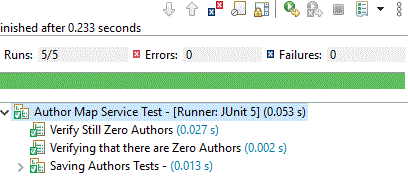
AuthorMapServiceTest.java

  • @BeforeEach -> setup before every test
  • @Nested -> group related tests
  • @DisplayName -> readable test names

Step 12: Run Tests Using Maven

  • Automatically detects test classes
  • Executes using Surefire plugin

mvn test

👁 JUnit Output Success
Comment
Article Tags:

Explore