|
VOOZH | about |
|
VOOZH | about |
TestNG is an automated testing framework. In this tutorial, let us explore more about how it can be used in a software lifecycle.
Unit Testing
Instead of testing the whole program, testing the code at the class level, method level, etc., is called Unit Testing The code has to be split into separate classes and methods so that testing can be carried out easily at a unit level.
Integration Testing
After the completion of Unit testing, there will always be the necessity for integration testing. Several units are tested in groups and this will help to reduce the defects exposed at the time of integration of several modules.
Example: We can run tests together by means of specifying "suite name" and can do different classes together.
Priority Testing
By using annotations like @Test(priority=1/2/...), we can set the priority of the tests. If a test class is having @Test annotation alone, it will high priority and if any specific test numbers are given, it is executed as per the order. So we can set the order of execution by using annotations as above. Let us take a maven project and from there will cover important topics.
Project Structure:
This is a maven kind of project and hence dependencies need to be mentioned in
pom.xml
In TestNG, Via XML files, We can pass parameters as specified in the below XML using <parameter> tag with name and value
These parameters are collected via @DataProvider or @Parameter in Java files
@DataProvider(name = "numbers")
public static Object[][] evenNumbers() {
 return new Object[][]{{11, false}, {2222, true}, {4882, true}};
 }
We can run tests together by means of specifying "suite name" and can do different classes together.
This specifies that "int" is the suite name and 2 classes namely com.gfg.MultiThreadedIntegrationTest and com.gfg.TimeOutCheckTest together. Like this, we can group classes under a single suite. And also we can specify different suite names and can group classes whichever we need. Dependency tests. i.e. depends upon a specific test and thereupon logging some information
Usecase: Check whether an email is valid or not and if valid, proceed to the next set of steps
private String userEmail = "geek@gfg.com";

@Test
public void checkForValidMail() {
 boolean validEmail = userEmail.contains("@");
 Assert.assertEquals(validEmail, true);
}


// If first test is success, below test executes and logs the information
@Test(dependsOnMethods = {"checkForValidMail"})
public void logInWhenEmailValid() {
 LOGGER.info("Given Email {} valid >> and logging in", userEmail);
}
Order of test execution can be controlled by using @Priority annotation
@Test(priority = 1) // This is executed first
public void stringToIntCheck() {
 String testString = "100";
 assertTrue(Integer.valueOf(testString) instanceof Integer);
 }

@Test(priority = 2) // This is second
public void intToStringCheck() {
 int testInt = 100;
 assertTrue(String.valueOf(testInt) instanceof String);
 }
Test Timeout can be mentioned by using @Test(timeout=<certain value>). TestNG supports for timed out tests.
@Test(timeOut = 1000, enabled = false)
public void asNoStoppingPointItRunsTimeOut() {
 while (true) ;
} private int evenNumber, oddNumber;
@BeforeClass
public void setup() {
evenNumber = 100;
oddNumber = 59;
}
@AfterClass
public void tearDown() {
evenNumber = 0;
oddNumber = 0;
}
As a whole let us see the java code with the above features
DependencyUnitTest.java
MultiThreadedIntegrationTest.java
OddOrEvenNumberCheck.java
ParametrizedUnitTest.java
PriorityUnitTest.java
TimeOutCheckTest.java
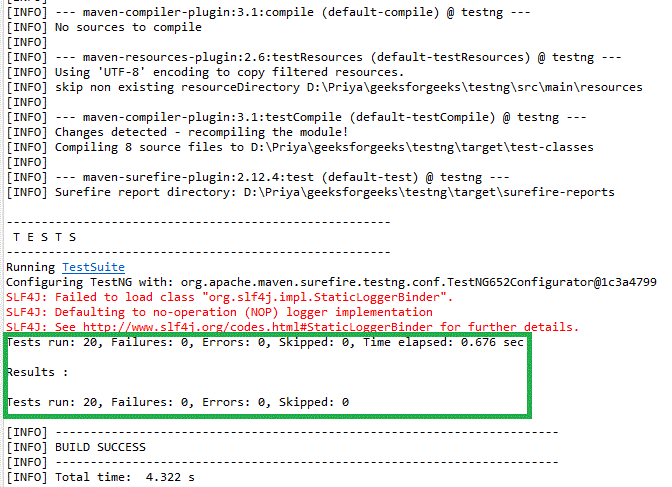
Now let's run the test by using
mvn test
Or from eclipse
Output:
We can see the success/failure reports under the target/surefire-reports folder as well.