|
VOOZH | about |
|
VOOZH | about |
The DOM is a programming interface for web documents. It represents the structure of an HTML or XML document as a tree, where each element, attribute, and piece of text is represented as a node. The DOM allows developers to manipulate the content and structure of a web page without requiring page reloads by interacting with these nodes programmatically, typically using JavaScript.
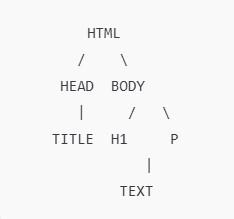
When a web page is loaded in a browser, it parses the HTML and transforms it into the DOM. This tree-like structure represents all elements on the page, from the root <html> element to the individual text nodes inside elements like <h1>, <p>, etc.
For example, consider a simple HTML document:
In the DOM:
<html> element is the root node.<head> and <body> elements are child nodes of <html>.<title> element is a child of <head>.<h1> and <p> elements are children of <body>.This hierarchical structure allows for easy access to elements, attributes, and text on the page, enabling dynamic interactions.
The DOM consists of different types of nodes that represent various parts of an HTML document. Some of the key node types include:
<div>, <h1>, and <p>.<h1>Hello World</h1>.id, class, or src.This structure is used by JavaScript (and by Selenium) to identify elements and manipulate their contents or attributes.
Selenium WebDriver allows developers to automate browser tasks by interacting with elements in the DOM. With Selenium for Java, we can easily perform actions like clicking buttons, filling forms, and verifying the content of web pages by accessing and manipulating the DOM. The key idea is that Selenium operates on the DOM and sends commands to the browser to interact with the elements.
Some common tasks that Selenium performs using the DOM include:
In Selenium Java, elements are located and manipulated using WebDriver methods. Here are some common ways to interact with DOM elements:
findElement() to locate an element by its id attribute:WebElement element = driver.findElement(By.id("elementID"));name attribute:WebElement element = driver.findElement(By.name("elementName"));WebElement element = driver.findElement(By.xpath("//h1[text()='Hello World']"));WebElement element = driver.findElement(By.cssSelector("h1"));WebElement element = driver.findElement(By.tagName("p"));Let's look at an example where we dynamically change the content of an <h1> tag when a button is clicked:
HTML Structure:
<button id="changeButton">Click Me</button>
<h1 id="heading">Hello World</h1>
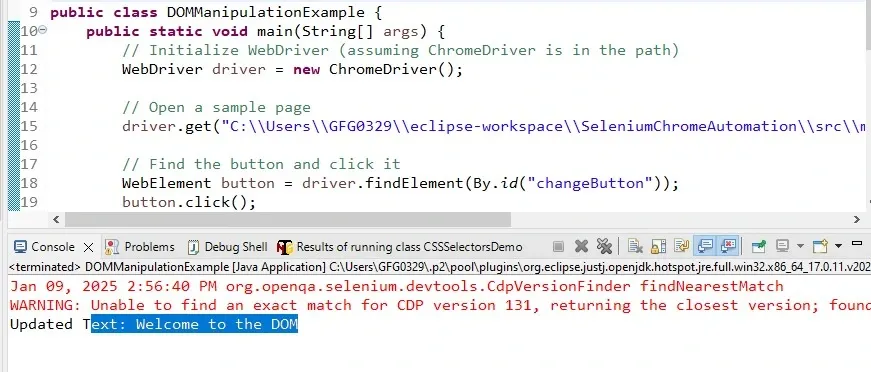
Selenium Java Code to Manipulate the DOM:
index.html file:
Output:
Explanation:
changeButton is located using its ID and clicked to trigger the action.<h1> element is changed programmatically after the button click using the setText() method (for simulation purposes).Selenium offers several methods for interacting with and manipulating elements in the DOM:
String text = element.getText();WebElement inputField = driver.findElement(By.id("input"));
inputField.sendKeys("Hello World");
WebElement button = driver.findElement(By.id("submitButton"));
button.click();
String classValue = element.getAttribute("class");inputField.clear();WebElement form = driver.findElement(By.id("loginForm"));
form.submit();
Understanding the DOM is crucial for building and automating dynamic web pages. Without the DOM, changes to the web page would require constant server requests and page reloads, making interactions sluggish. Selenium leverages the DOM to interact with elements, simulate user actions, and verify the state of a page during automated testing.