|
VOOZH | about |
|
VOOZH | about |
TestNG (Test Next Generation) is a popular testing framework for Java applications that facilitates the efficient and organized execution of test cases. TestNG parameters provide a flexible way to pass values to test methods, enhancing test reusability and making it easier to perform data-driven testing.
<parameter name="param" value="First parameter" />
TestNG parameters offer several features that enhance testing efficiency and organization:
The TestNG Parameters method is used to send the parameter value (string type) directly to the test method at runtime from the testng.xml file. To use this method, we need to pass a parameter value to the test method using the parameter description.
Step 1: Open Eclipse and create a new Java project. Create a sample package within the project, and in the package, add a class with TestNG parameters to specify test data.
Step 2: Create a Java class file named "ParameterTest" in the sample package to implement TestNG parameters and define your test methods.
Step 3: In "ParameterTest" to automate the Google homepage, retrieve its title, and parameterize the browser and URL in the testng.xml configuration file for flexible testing configurations.
ParameterTest.java
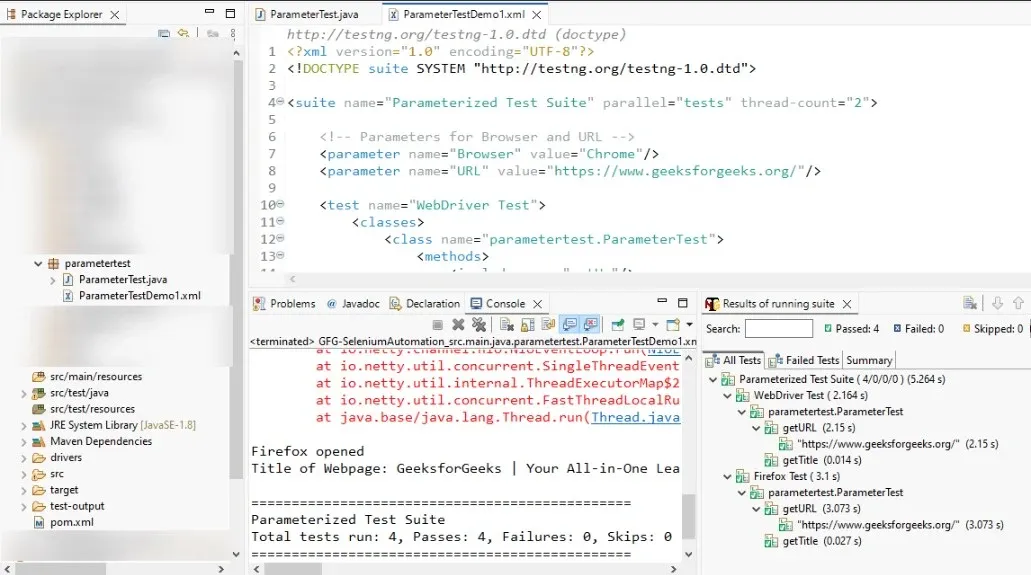
Step 4: Create a new file named "ParameterTestDemo1.xml" in the TestNG project. This XML file will be used to configure and execute TestNG tests, including parameters for the "ParameterTest" class.
ParameterTestDemo1.xml
Step 5: Open the testng.xml file in Eclipse, right-click on it, and choose "Run As" > "TestNG Suite".
TestNG Suit Output:
With testNG parameters significantly contributes to increased efficiency and reliability in software testing by delivering flexibility, reducing code duplication, easing maintenance, and improving overall test management.